Limited offer · on the snapshot· Closing in00d00h00m00sClaim now →
Module 01 · Dashboard designs

GoHighLevel dashboard design your clients open on purpose

The dashboard is the first screen after every login. Turn it into a branded welcome page with a greeting, live clock, quick links and chart colours in your palette. Try all 18 designs right here.

Loading the live preview

Northern Lights: Every chip is a real dashboard template applied to a copy of the GoHighLevel dashboard. The clock is live; the charts are sample data.

What it isA GoHighLevel dashboard design is a saved style for the sub-account dashboard. It sets the page canvas, card look, header and chart colours, and can add a welcome banner with your greeting, a live clock and quick-link buttons. It changes appearance only; every number still comes from GoHighLevel’s own widgets. You set it up yourself in the dashboard designer.
18
dashboard designs in the catalogue
6
with photo backdrops
5
dark designs, photo ones included
1
install covers every sub-account
Three families

Photo, light or dark: pick the mood, then the design

Every design is listed by name, exactly as it appears in the dashboard designer.

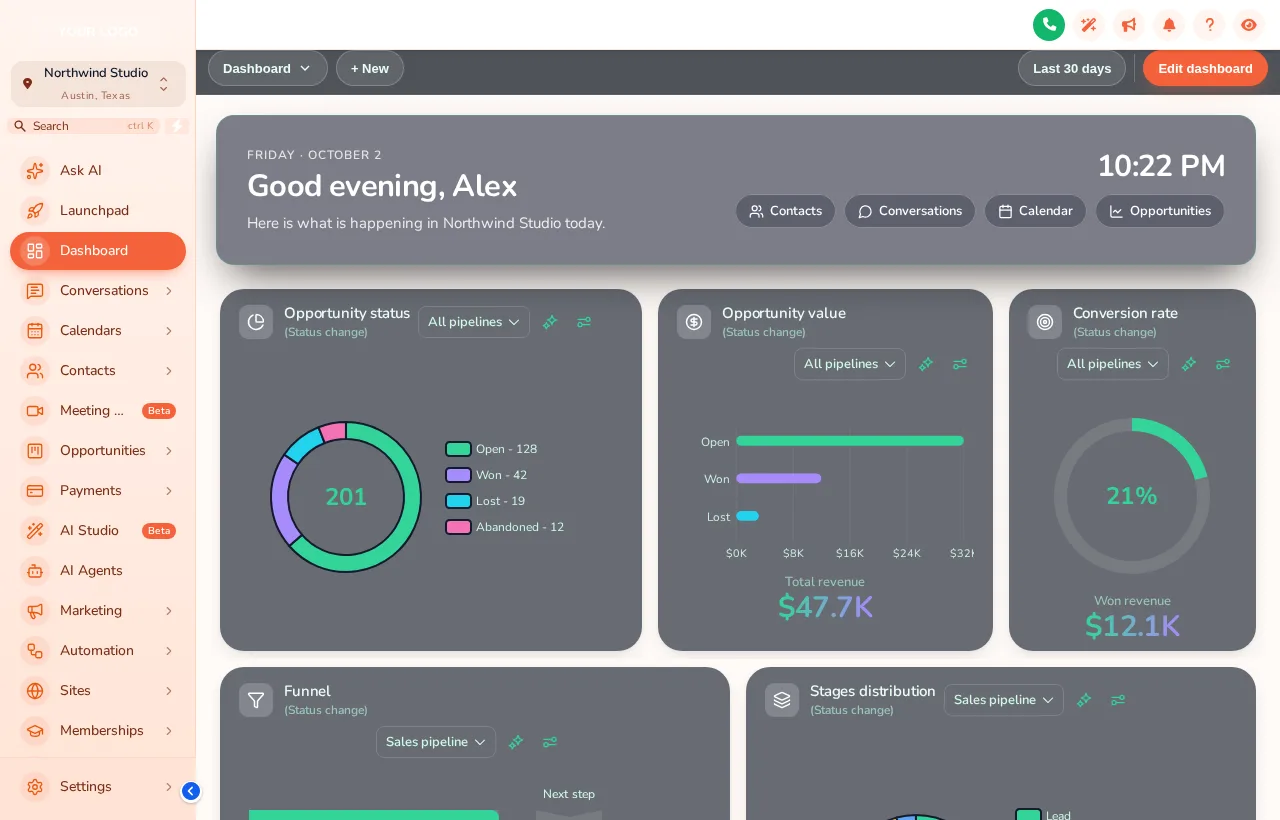
GoHighLevel dashboard with the Northern Lights design: dark glass cards, green and violet charts and a welcome banner with a live clock
Northern Lights with the Sunset Coral sidebar: dark glass cards and a welcome banner.
Photo · 6

Built for demos

Northern Lights, Pastel Sky, City Nights, Lagoon, Golden Hour, Liquid 3D. A photo backdrop behind glass cards, the strongest first impression in a sales call.

Light · 9

Built for daily use

Aurora Glass, Clean Bento, Sunset Warm, Ocean Pro, Emerald Finance, Candy Pastel, Brand Match, Slate Minimal, Neo Brutal. Bright, quiet layouts for clients who check leads every morning.

Dark · 3

Built for long sessions

Midnight Neon, Obsidian Gold, Cyber Grid. Low-glare canvases that pair with a dark theme.

Problem → outcome

The stock dashboard tells clients nothing about you

Before

  • A grid of default widgets in GoHighLevel’s colours
  • No greeting, no sense of whose platform this is
  • Clients hunt through the menu for conversations and reports
  • Every agency’s clients see the same screen

After

  • Your palette on cards, header and every chart
  • A welcome banner with the client’s name and your wording
  • Quick links to the four pages they actually use
  • A screen they associate with your agency
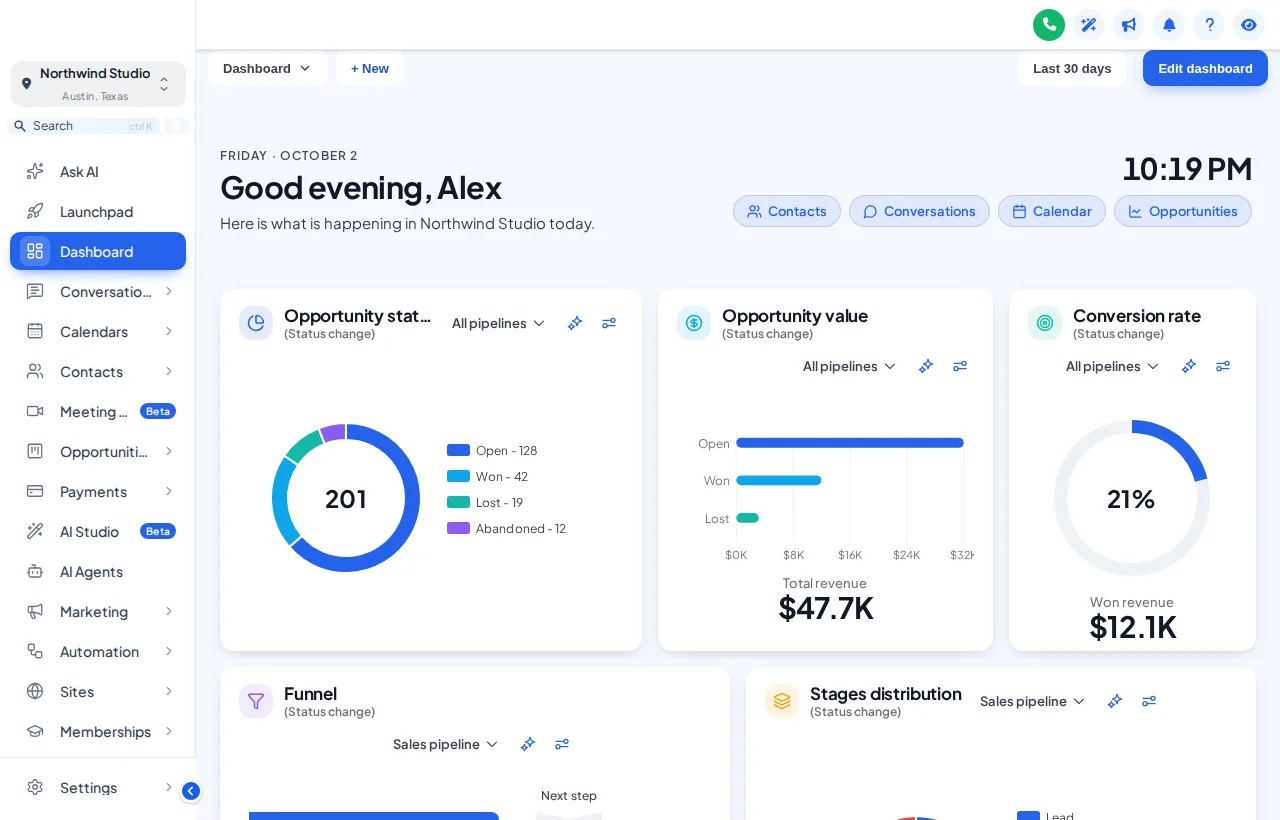
GoHighLevel dashboard with the Clean Bento design and the Care Desk theme: white tiles, bold numbers and blue accents
Clean Bento with the Care Desk theme, the calm option for reporting clients.
For your agency

How marketing agencies use a designed dashboard

Lead-gen retainers

Quick links to Conversations and Opportunities put new leads one click from the login, which is the number your client cares about.

Reporting clients

A quiet light design keeps opportunity value and conversion rate readable, and a "Reports" quick link points to your monthly report.

SaaS sales demos

Open a prospect’s trial sub-account on a photo design and the first thing they see is a finished product with your name on it.

Onboarding week

Point a quick link at your onboarding checklist or help page so new clients know the next step without emailing you.

How you set it up

Four steps to your dashboard

All in the dashboard designer, with a preview of each change. No code beyond the one install line.

Included from Campaign ProTogether with menus, the pipeline board and contact actions.

Get Campaign Pro, $697
  1. Choose a starting design

    Open the dashboard designer in your account and pick one of the 18 designs you tried in the preview above.

  2. Set the welcome banner

    Write the greeting, pick the backdrop and set the quick links each client needs: conversations, calendar, reports, or your own help page.

  3. Match chart colours to your brand

    Set chart palettes, card style and header to your colours so the dashboard sits inside the rest of your theme, with a live preview as you go.

  4. Publish

    Save, and if your one-line install is already in GoHighLevel the new dashboard reaches every sub-account on its next page load. Open one to check it at desktop and phone sizes.

Packages

Dashboard designs start in Campaign Pro

Package 1

Brand Sprint

$297one-time

The branding account: every theme, UI kit and login design, dark mode and your colours, in a live editor you control.

Lifetime access1 workspace3 team members
  • All 27 themes and 11 UI kits, with your logo and colours
  • Dark mode for GoHighLevel pages
  • Sidebar or top-bar menu layout
  • All 16 animated login page designs
Get Brand Sprint

Best for: Freelancers and small agencies that want clients logging in to their brand today.

Package 3

Agency Takeover

$1,497one-time

Everything in Campaign Pro, plus popups, notifications, calculators and floating widgets for the app and your websites, widget leads sent to GoHighLevel, and the editor itself white-labelled with your brand.

Lifetime access3 workspaces10 team members
  • Everything in Campaign Pro
  • Popups: 43 templates, up to 15 live
  • Notifications and social proof: 94 templates, up to 15 live
  • Calculators: 134 templates, up to 10 live
Get Agency Takeover

Best for: Agencies running GoHighLevel as their own branded SaaS, or putting widgets on many client sites.

One-time payment by card through Stripe, lifetime access, no monthly fee. Login emailed within minutes of payment (max 24 hours). Secure checkout by Stripe.

Questions agencies ask

GoHighLevel dashboard questions

Yes. A dashboard design restyles the sub-account dashboard GoHighLevel already shows: canvas, cards, chart colours and header, plus an optional welcome banner with a live clock and quick links. There are 18 designs to start from.

No. It only changes how the dashboard looks. The widgets, numbers and filters are the ones GoHighLevel already provides for that sub-account.

A banner at the top of the dashboard with a greeting, the date, a live clock and buttons that jump to the pages your clients use most. You choose the wording and the links.

The design is published agency-wide, so all sub-accounts share it. Widgets and data inside each dashboard stay specific to that client.

The backdrop is a single compressed image loaded once, and the effects are CSS. If a client prefers a lighter look, the light and dark designs use no photo at all.

Clean Bento and Ocean Pro keep numbers large and quiet, which suits clients who log in to check leads. Northern Lights and City Nights are better when the dashboard is part of your sales demo.

Yes. Use the phone toggle in the preview: cards stack and the banner shortens.

It starts in Campaign Pro ($697 one-time, lifetime access) and is also part of Agency Takeover.

No. Your account includes the dashboard designer and you set it up yourself; it takes minutes, and support can help if you get stuck.

Dashboard designs

Give every login a branded welcome

Campaign Pro unlocks the dashboard designer and all 18 designs. Your login arrives within minutes; one-time payment, lifetime access.

One-time payment·Lifetime access·Login emailed within minutes

GHL Customizer accounts are sold by Digital Marketing Snapshot and run on the GHL Customer Care customizer platform. You customize and install your design yourself. GoHighLevel and HighLevel are trademarks of their owner; we are independent and not affiliated with or endorsed by HighLevel. Previews use sample data. Prices last checked October 2, 2026.

Get your GHL Customizer account

One-time payment, lifetime access. Your login is emailed within minutes of payment.

Package
Campaign Pro2 workspaces, 5 team members · lifetime access
$697

Secure payment by Stripe. Card details never touch our site.