
Limited offer · on the snapshot· Closing in00d00h00m00sClaim now →
Module 04 · Sidebar, top bar, mega menus

GoHighLevel sidebar customization, in your clients’ words

"Opportunities" means nothing to a dentist. Rename, reorder and group the menu around how your clients work, then pick where it lives: sidebar, top bar, mega menus or a floating quick menu.

In Campaign Pro, $697 one-time
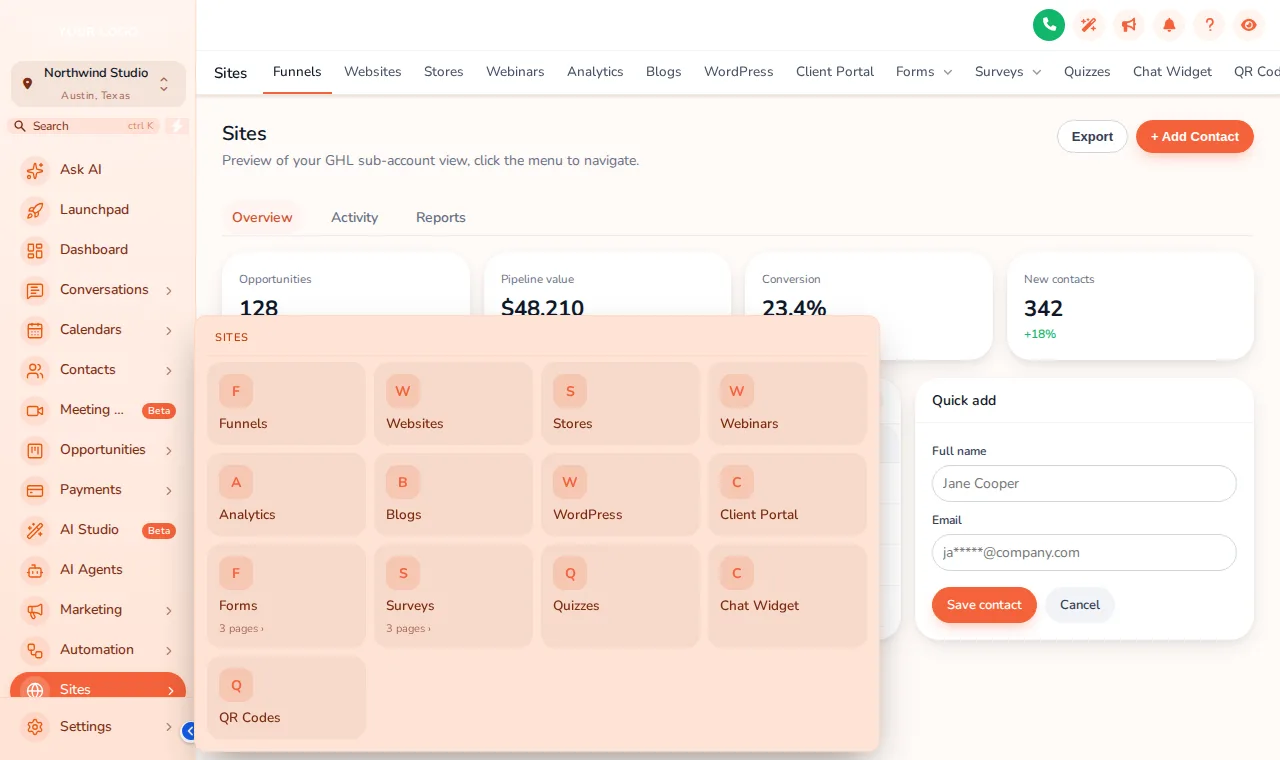
GoHighLevel sidebar with the Sites section opened as a Tiles mega menu: a grid of cards for Funnels, Websites, Stores and more
Sites opened as a Tiles mega menu on the Sunset Coral theme.
What you getGoHighLevel sidebar customization means controlling every item in the app menu: its label, order, icon, grouping and visibility, separately for agency and sub-account users, plus the layout itself. The menu can stay a left sidebar, move right, become a top bar, open sections as mega menus, or add a floating quick menu.
3
menu positions: left, right, top
8
top bar styles
8
mega menu styles
8
header styles
Live preview

Switch layouts, then hover the menu

Rename for your clients

Same features, labels your clients understand

An example from a lead-gen agency. Your labels will follow your offer.

GoHighLevel labelYour label
ConversationsInbox
OpportunitiesDeals
SitesWebsites & Funnels
ReputationReviews
ReportingResults
MarketingCampaigns
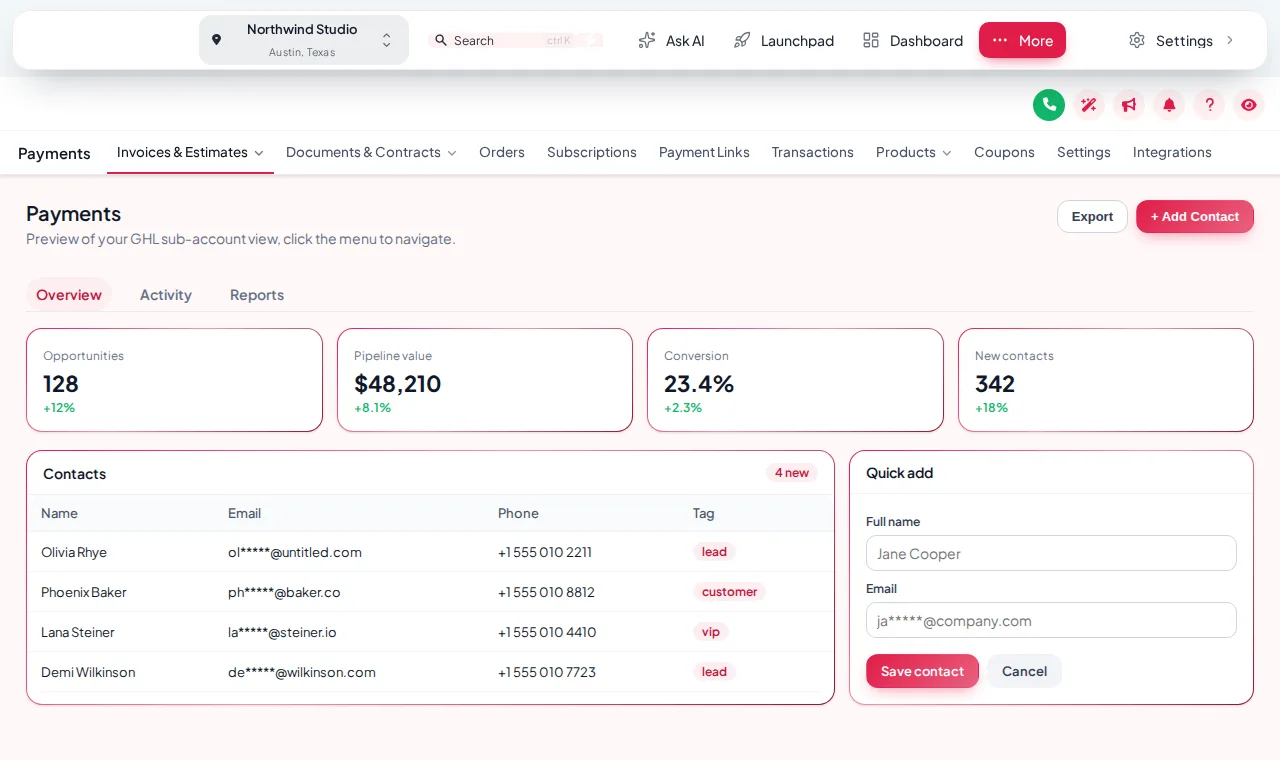
GoHighLevel with the menu moved into a floating top bar on the Creative Agency theme, Payments section open
A floating top bar on the Creative Agency theme.
Floating quick menu

Shortcuts that follow your team around

A launcher on every page with the six or seven places your team jumps between all day. Drag it anywhere; it remembers the spot.

  • 3 layouts: Bubble + grid, Dock bar, Side rail
  • 8 designs to match your theme
  • Any pages you choose, including custom links

Loading the live preview

Bubble and grid: The quick menu floats over every page. Click the bubble, hover the dock, or drag it by its grip.

How you set it up

Four steps to a menu that fits your offer

Before

  • 30+ items, half of them irrelevant to the client
  • Agency jargon in every label

After

  • The daily pages first, in plain words
  • Everything else grouped or hidden
  1. Audit the menu with your offer

    List every menu item your clients can see and mark which ones they use, which ones confuse them and which ones should disappear.

  2. Rename, reorder and group

    In the menu builder, give items labels in your clients’ language, move the daily ones to the top and group related pages under one heading.

  3. Pick the layout

    Left or right sidebar or a top bar in one of 8 styles in every package; mega menus in 8 styles and a floating quick menu from Campaign Pro.

  4. Add your own links and publish

    Point custom items at your help centre, a booking page or the monthly report, then save. The change reaches every sub-account on its next page load.

Menus are part of Campaign ProWith the dashboard, pipeline board and contact actions.

Get Campaign Pro, $697
Packages

Menus start in Campaign Pro

Package 1

Brand Sprint

$297one-time

The branding account: every theme, UI kit and login design, dark mode and your colours, in a live editor you control.

Lifetime access1 workspace3 team members
  • All 27 themes and 11 UI kits, with your logo and colours
  • Dark mode for GoHighLevel pages
  • Sidebar or top-bar menu layout
  • All 16 animated login page designs
Get Brand Sprint

Best for: Freelancers and small agencies that want clients logging in to their brand today.

Package 3

Agency Takeover

$1,497one-time

Everything in Campaign Pro, plus popups, notifications, calculators and floating widgets for the app and your websites, widget leads sent to GoHighLevel, and the editor itself white-labelled with your brand.

Lifetime access3 workspaces10 team members
  • Everything in Campaign Pro
  • Popups: 43 templates, up to 15 live
  • Notifications and social proof: 94 templates, up to 15 live
  • Calculators: 134 templates, up to 10 live
Get Agency Takeover

Best for: Agencies running GoHighLevel as their own branded SaaS, or putting widgets on many client sites.

One-time payment by card through Stripe, lifetime access, no monthly fee. Login emailed within minutes of payment (max 24 hours). Secure checkout by Stripe.

Questions agencies ask

GoHighLevel menu questions

Yes. Every sidebar item can be renamed, reordered, hidden or grouped, separately for the agency view and the sub-account view. You can also add custom links with their own icons.

Yes. The menu can sit in a top bar (8 styles), a right sidebar, or collapse to an icon rail. Try each one in the preview.

A mega menu opens a whole section, such as Sites, as a panel of links instead of a long list. There are 8 styles: Columns, Split, Cascade, Tiles, Tabs, Icon rail, Accordion, Wide.

A small launcher that floats over every page with shortcuts to the pages you pick. It comes in 3 layouts and 8 designs and can be dragged anywhere.

Hiding changes the menu, not permissions. To block a feature for a user, use GoHighLevel’s own user roles alongside your menu.

Labels change only in your interface. Keep a short list of your labels next to GoHighLevel’s names for your team, so support articles still make sense.

Yes. Check the phone view in the preview: the menu collapses into a drawer as it does in GoHighLevel.

Sidebar or top-bar layout is in every package. Mega menus and the floating quick menu start in Campaign Pro ($697 one-time, lifetime access) and are also in Agency Takeover.

Sidebar and menus

A menu that speaks your clients’ language

Campaign Pro unlocks mega menus and the floating quick menu on top of every theme and layout. Login within minutes, lifetime access.

One-time payment·Lifetime access·Login emailed within minutes

GHL Customizer accounts are sold by Digital Marketing Snapshot and run on the GHL Customer Care customizer platform. You customize and install your design yourself. GoHighLevel and HighLevel are trademarks of their owner; we are independent and not affiliated with or endorsed by HighLevel. Previews use sample data. Prices last checked October 2, 2026.

Get your GHL Customizer account

One-time payment, lifetime access. Your login is emailed within minutes of payment.

Package
Campaign Pro2 workspaces, 5 team members · lifetime access
$697

Secure payment by Stripe. Card details never touch our site.