
For a Los Angeles marketing agency, an Astro website will almost always beat a WordPress one on the two numbers that decide whether your site earns its keep: Google PageSpeed and Core Web Vitals. Astro ships near-zero JavaScript and serves static-first pages from the edge, so a well-built Astro site routinely scores 90–100 on PageSpeed and passes all three Core Web Vitals — where a typical plugin-laden WordPress site lands in the 40–70 range and fails on mobile. In a market as crowded as LA, that speed gap is the difference between a prospect booking a call and bouncing to the agency listed right below you.
This is the operator’s comparison, not a framework holy war. I run tracking and conversion for agencies, so I care about one thing: does the site turn attention into booked calls? Below, every claim is sourced and dated, and at the end there’s a straight answer on when WordPress still makes sense — and when a done-for-you Astro build is the smarter move.
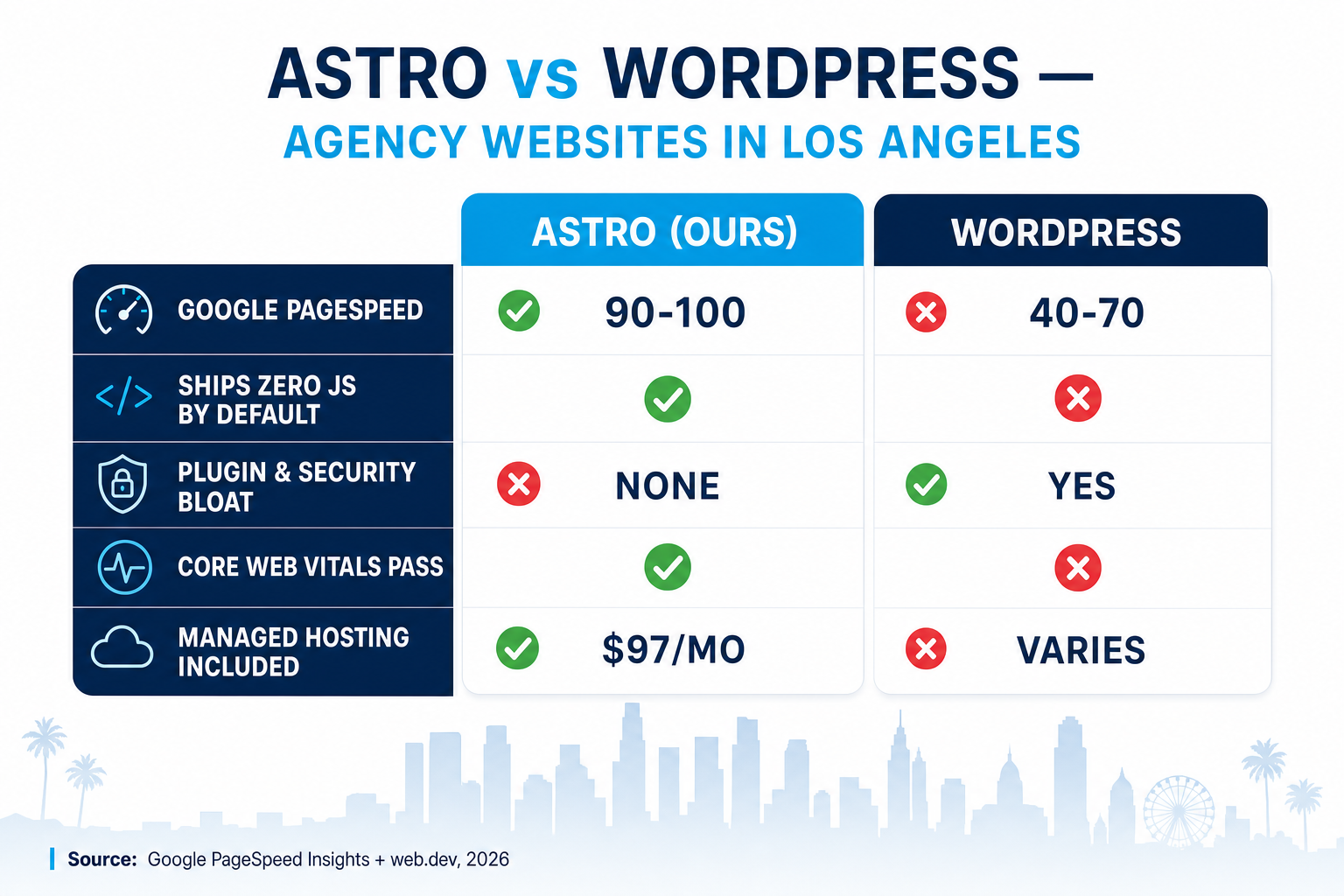
Table of contents
- Why website speed is a business problem, not a tech one
- Astro vs WordPress: the architecture difference
- Page speed compared: what the scores actually look like
- Core Web Vitals: the 2026 pass marks
- Why this matters more in Los Angeles
- “But WordPress is more flexible” — the honest counterpoint
- How to switch without tanking your SEO
- FAQ
Why website speed is a business problem, not a tech one
Your agency website is a sales rep that works 24/7. It has one job: keep a prospect on the page long enough to trust you and book a call. Every second it makes them wait, it talks them out of it.
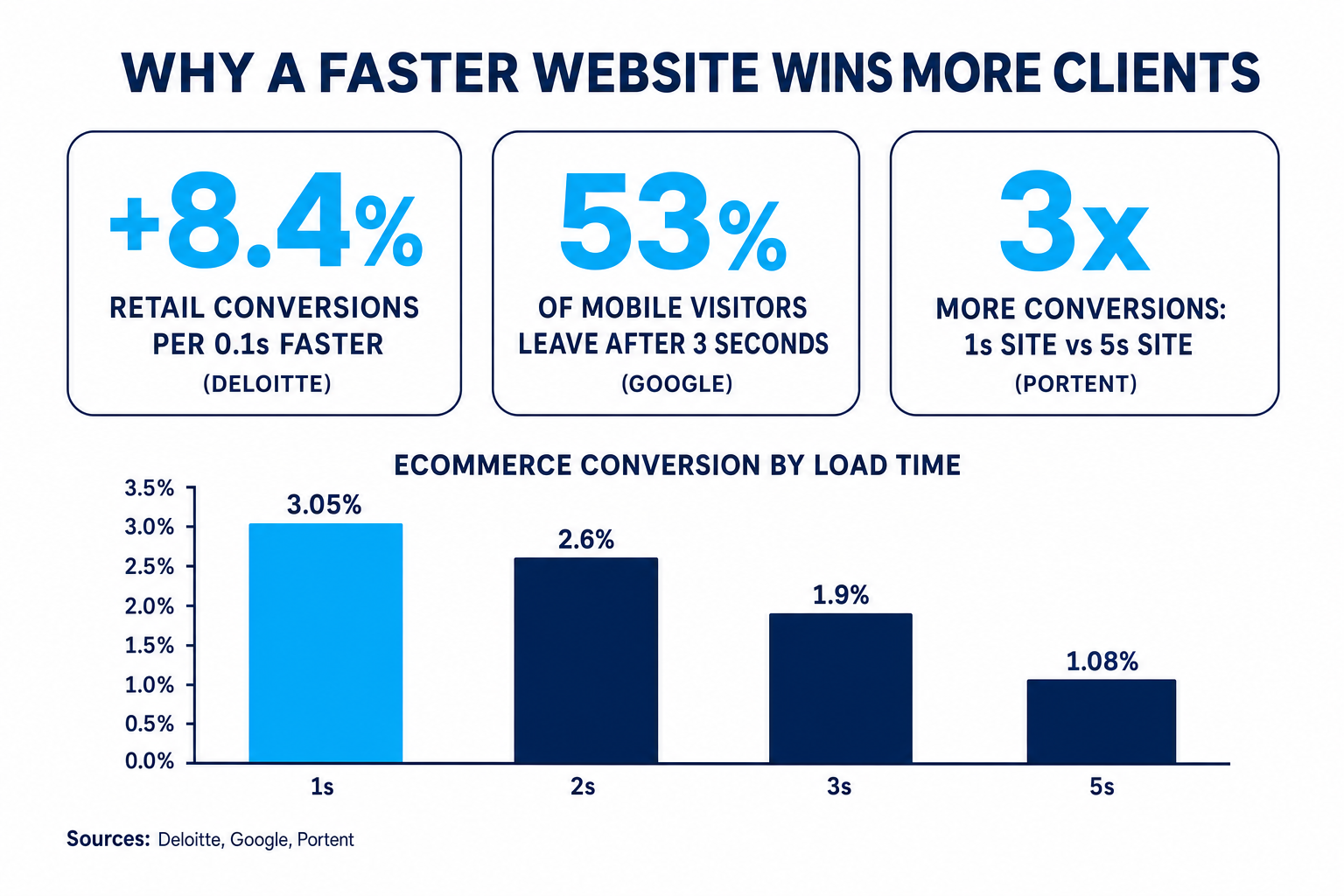
The data on this is unusually blunt. Deloitte’s Milliseconds Make Millions study, run across 30 million user sessions, found that a mere 0.1-second improvement in mobile site speed increased retail conversions by 8.4% and travel conversions by 10.1%, with average order value climbing alongside (web.dev / Deloitte). That’s a tenth of a second — faster than you can blink — moving the revenue needle by high single digits.
The downside is just as sharp. Google’s benchmark data shows 53% of mobile site visits are abandoned if the page takes longer than three seconds to load, and the probability of a bounce climbs 32% as load time moves from one second to three (Think with Google). Half your ad-driven, hard-won mobile traffic can vanish before your hero section even finishes painting.
And it compounds at the conversion stage. Portent’s analysis of website load times found an ecommerce site that loads in 1 second converts at 3.05%, versus just 1.08% at 5 seconds — roughly 3x more conversions for the faster site (Portent).
If you sell speed-to-lead and conversion optimization to clients — and most LA agencies do — a slow homepage quietly undercuts your whole pitch. It’s hard to sell performance from a site that fails a performance test. (We wrote a whole playbook on why the first 60 seconds decide the deal in Speed-to-Lead for Agencies.)
Astro vs WordPress: the architecture difference
The speed gap isn’t about who tries harder. It’s baked into how each system builds a page.
WordPress is dynamic by default. When a visitor hits a typical WordPress page, the server boots PHP, queries a MySQL database, assembles the page from a theme, and runs whatever plugins are active — a slider, a form builder, analytics, a page builder like Elementor or Divi, a security plugin, and so on. Each plugin adds its own CSS and JavaScript. A common agency site ends up shipping 1–3 MB of JavaScript the browser has to download, parse, and execute before the page feels ready. Caching plugins help, but they’re a patch over an architecture that does a lot of work on every request.
Astro is static-first. It renders your pages to plain HTML at build time and serves them from a global edge network (in our case, Cloudflare). Crucially, Astro ships zero JavaScript by default — its “islands” architecture only hydrates the specific interactive components that genuinely need JS (a chat widget, a form), and leaves the rest as fast static HTML (Astro docs). There’s no database query on page load, no plugin stack, no theme overhead. The browser gets a small, finished page and paints it almost instantly.
What a visitor's browser actually does
Server boots PHP → queries the database → assembles theme + 8–15 plugins → ships 1–3 MB of JavaScript → browser parses everything → page finally becomes interactive. Score often 40–70 on mobile.
Edge serves a pre-built static HTML page → near-zero JavaScript → browser paints instantly → only tiny interactive 'islands' hydrate. Score routinely 90–100 on mobile and desktop.
That architectural difference is why the speed comparison isn’t close for a content-and-lead-gen site like an agency’s. You’re not fighting WordPress’s tuning — you’re fighting its design.
Page speed compared: what the scores actually look like
Here’s the head-to-head on the metrics that matter for an agency marketing site. These are representative ranges for a real-world build (not a stripped demo), based on PageSpeed Insights scoring.
Representative mobile Google PageSpeed scores (0–100). Source: Google PageSpeed Insights / web.dev, 2026.
| What you’re comparing | Astro (our build) | WordPress (typical agency site) |
|---|---|---|
| Google PageSpeed (mobile) | 90–100 | 40–70 |
| JavaScript shipped by default | Near zero | 1–3 MB (theme + plugins) |
| Rendering model | Static HTML from the edge | PHP + database on request |
| Core Web Vitals (out of the box) | Passes LCP / INP / CLS | Usually fails INP or LCP on mobile |
| Security surface | Static — no plugin exploits | Plugins are the #1 attack vector |
| Ongoing maintenance | Managed for you | Plugin updates, breakage, patching |
Editing meta, schema, llms.txt |
Built in, per page | Needs plugins / manual work |
| Typical monthly cost | $97/mo all-in | Hosting + plugin licenses, variable |
The pattern is consistent: WordPress can be made fast, but it takes caching plugins, a lean theme, image optimization, and constant vigilance — and one plugin update can undo months of tuning. Astro is fast because there’s simply less for the browser to do.
Core Web Vitals: the 2026 pass marks
Page speed is the headline, but Google grades your real-world experience with Core Web Vitals, measured on actual Chrome visitors at the 75th percentile. In 2026 the “good” thresholds are:
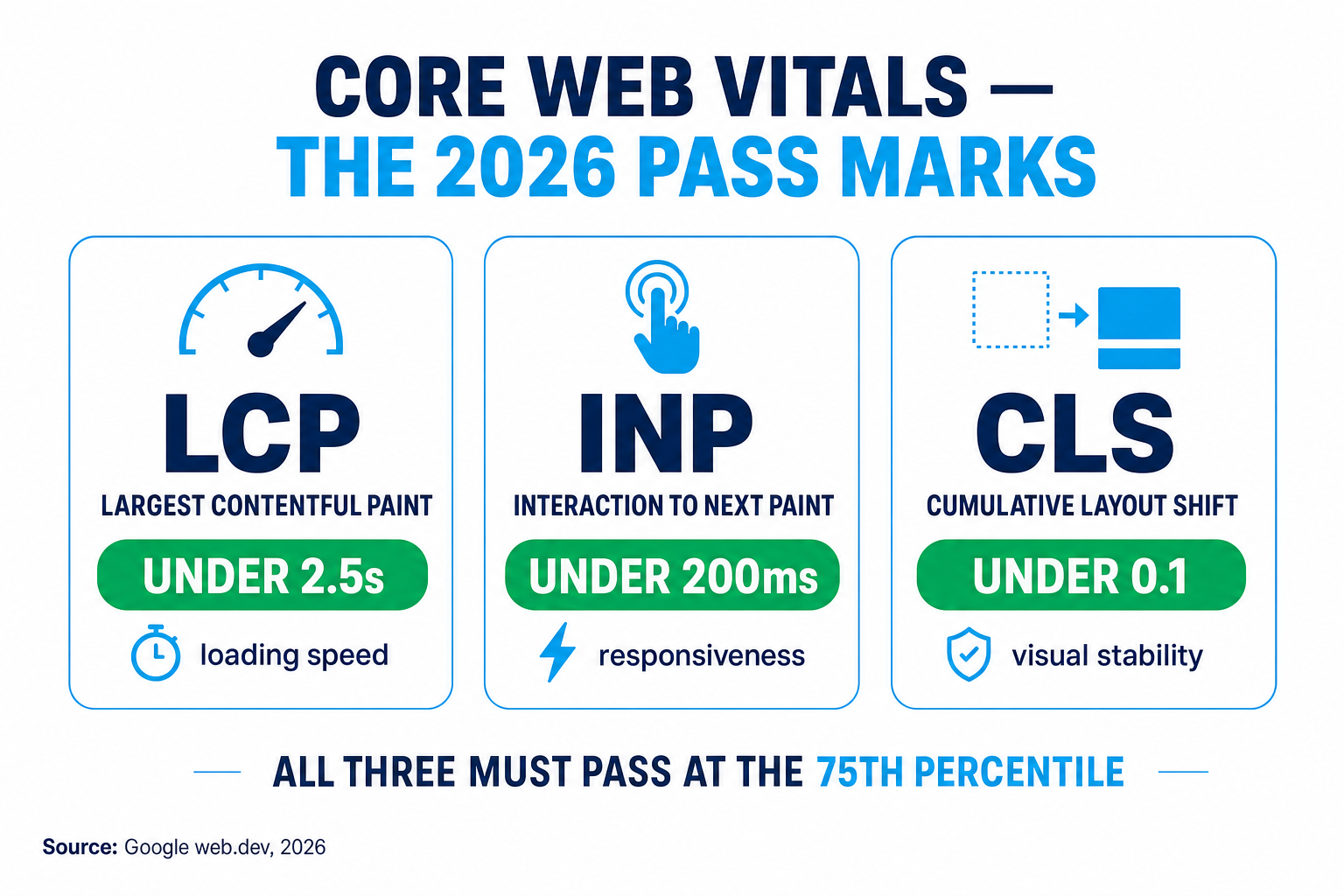
- LCP (Largest Contentful Paint) — under 2.5 seconds. How fast your main content loads.
- INP (Interaction to Next Paint) — under 200 milliseconds. How responsive the page feels when tapped.
- CLS (Cumulative Layout Shift) — under 0.1. How much the layout jumps around while loading.
All three have to pass for a “good” overall assessment (web.dev). These are a confirmed ranking signal — not the biggest one, but a genuine tiebreaker when two agencies have comparable content and are fighting for the same LA search term.
Here’s where WordPress struggles most: INP. All that plugin JavaScript has to execute on the main thread, so the page can feel sluggish when a visitor taps a menu or a form — exactly the moment you want zero friction. Astro’s near-zero-JS pages keep the main thread free, so INP passes comfortably without you thinking about it. Faster pages also feed your lead attribution cleaner data, because fewer visitors bounce before your tracking even fires.
Why this matters more in Los Angeles
Speed is a national advantage, but in Los Angeles it’s a survival trait.
California is home to 16,523 advertising agencies (IBISWorld), and a huge share of them cluster around LA, competing for the same high-value local searches — “social media agency Los Angeles,” “PPC agency near me,” “web design Santa Monica.” When a prospect searches on their phone between meetings, they don’t scroll patiently. They tap the first result, and if it stalls for three seconds, they tap back and try the next one. You already know this — getting clients for a marketing agency is hard enough without your own site sabotaging the click.
There’s also a local-SEO angle. A fast, static site makes it trivial to publish clean, schema-rich location pages — “PPC Management in Los Angeles,” “SEO for Pasadena Businesses” — that load instantly and are easy for Google’s crawlers and AI answer engines (AI Overviews, Perplexity, ChatGPT) to parse and cite. On WordPress, every location page is another database-driven template fighting the same speed penalty. On Astro, they’re pre-rendered and effectively free to serve.
“But WordPress is more flexible” — the honest counterpoint
I promised straight talk, so here it is: WordPress isn’t wrong. There are real cases where it’s the right call.
- You need a specific WordPress plugin ecosystem — a complex membership site, a LearnDash course, WooCommerce with 500 SKUs and heavy inventory logic. Astro isn’t built for that.
- A non-technical team edits content hourly and is deeply trained on the WordPress editor, and you’re not willing to change that workflow.
- You have a developer on staff who will keep the theme lean, plugins minimal, and Core Web Vitals green — and actually has the time to do it.
But for the typical agency marketing site — a homepage, service pages, location pages, a blog, case studies, and lead forms — WordPress’s flexibility is mostly overhead you pay for and rarely use. You inherit the plugin-security surface (plugins are the leading WordPress attack vector), the maintenance treadmill, and the speed penalty, in exchange for flexibility a brochure-and-lead-gen site doesn’t need. For that job, static-first wins on almost every axis that touches revenue.
Astro also handles the things agencies actually ask for later — editable meta and Open Graph tags per page, JSON-LD schema, a hand-tuned llms.txt for AI search, custom code, and an AI chat widget — natively, instead of bolting on another plugin.
How to switch without tanking your SEO
The number-one fear I hear is “won’t I lose my rankings?” Done right, you don’t — you usually gain, because speed and Core Web Vitals improve. Here’s the safe path we follow on every migration:
- Crawl and map every URL. Export your current WordPress URLs so nothing gets orphaned. Every existing page gets a matching page or a 301 redirect on the new site.
- Rebuild the high-traffic pages first, preserving titles, meta descriptions, H1s, and body content that already rank. Astro makes per-page meta and schema editable, so you keep (and clean up) your on-page SEO.
- Set 301 redirects from any changed URLs to their new homes, so link equity carries over.
- Match or beat the content depth of what ranked before — Google rewards the same quality, now served faster.
- Launch, submit the new sitemap in Search Console, and monitor Core Web Vitals as real-user data rolls in.
Because the new pages load faster and pass Core Web Vitals, most sites see rankings hold and then tick up over the following weeks. If you’d rather not run this yourself, it’s exactly what our Get a Website team does for a living — and you can compare it against the full snapshot pricing or buy the snapshot if you want the whole agency automation system, not just the site.
FAQ
Astro vs WordPress for LA agencies — quick answers
Is Astro actually faster than WordPress for a marketing agency website?
Yes, for a typical content-and-lead-gen agency site. Astro ships near-zero JavaScript and serves pre-built static HTML from the edge, so it routinely scores 90–100 on Google PageSpeed, while a plugin-heavy WordPress site commonly lands at 40–70 on mobile. The gap comes from architecture: WordPress runs PHP and a database query on most requests, while Astro doesn't.
Will moving from WordPress to Astro hurt my Google rankings?
Not if the migration is done properly. You map every existing URL, keep titles, meta, and content that already rank, and set 301 redirects for any changed URLs. Because the new Astro pages are faster and pass Core Web Vitals, most sites hold their rankings and then improve over the following weeks.
What are the Core Web Vitals thresholds I need to pass in 2026?
The 'good' bars are LCP (Largest Contentful Paint) under 2.5 seconds, INP (Interaction to Next Paint) under 200 milliseconds, and CLS (Cumulative Layout Shift) under 0.1, measured on real Chrome visitors at the 75th percentile. WordPress most often fails INP because of plugin JavaScript; Astro passes all three out of the box.
Can I still edit an Astro site if I'm not technical?
Yes. With our Get a Website service you don't touch code at all — your $97/month includes up to 10 support tickets for changes, plus hosting, domain, SSL, and maintenance. You request the edit, we ship it, and your Core Web Vitals stay green.
How much does a done-for-you Astro agency website cost?
Our Get a Website service is $497 one-time plus $97/month, and you only pay the monthly up front — the one-time fee is charged after the site is live and you're happy. That covers the build, managed Cloudflare hosting, domain, SSL, local SEO, schema, an AI chat widget, and ongoing updates.
Does a faster site really help in a market as big as Los Angeles?
Especially there. California has over 16,500 advertising agencies competing for the same local searches, and 53% of mobile visitors abandon a page that takes more than three seconds to load. In a crowded market, a fast site keeps the clicks you already paid for instead of handing them to the next agency in the results.
Written by Callan Reeves, Performance Marketing & Attribution Lead. Callan came up on the media-buying side managing seven-figure ad budgets, then rebuilt the tracking stack inside GoHighLevel so every conversion ties back to a campaign. He writes about speed-to-lead, attribution, and proving the ROI clients actually believe.
Related reading: Speed-to-Lead for Agencies · Lead Attribution That Proves Your ROI · Digital Marketing Agency Benchmarks 2026 · How to Get Clients for a Marketing Agency