
It is Thursday at 4:50pm and a client replies to a thread you had honestly forgotten existed: “Any update on the landing page you said would be ready Monday?” You did not forget the client. You forgot the task. It lived in a voice note, a Slack message, and your memory, and all three failed at once.
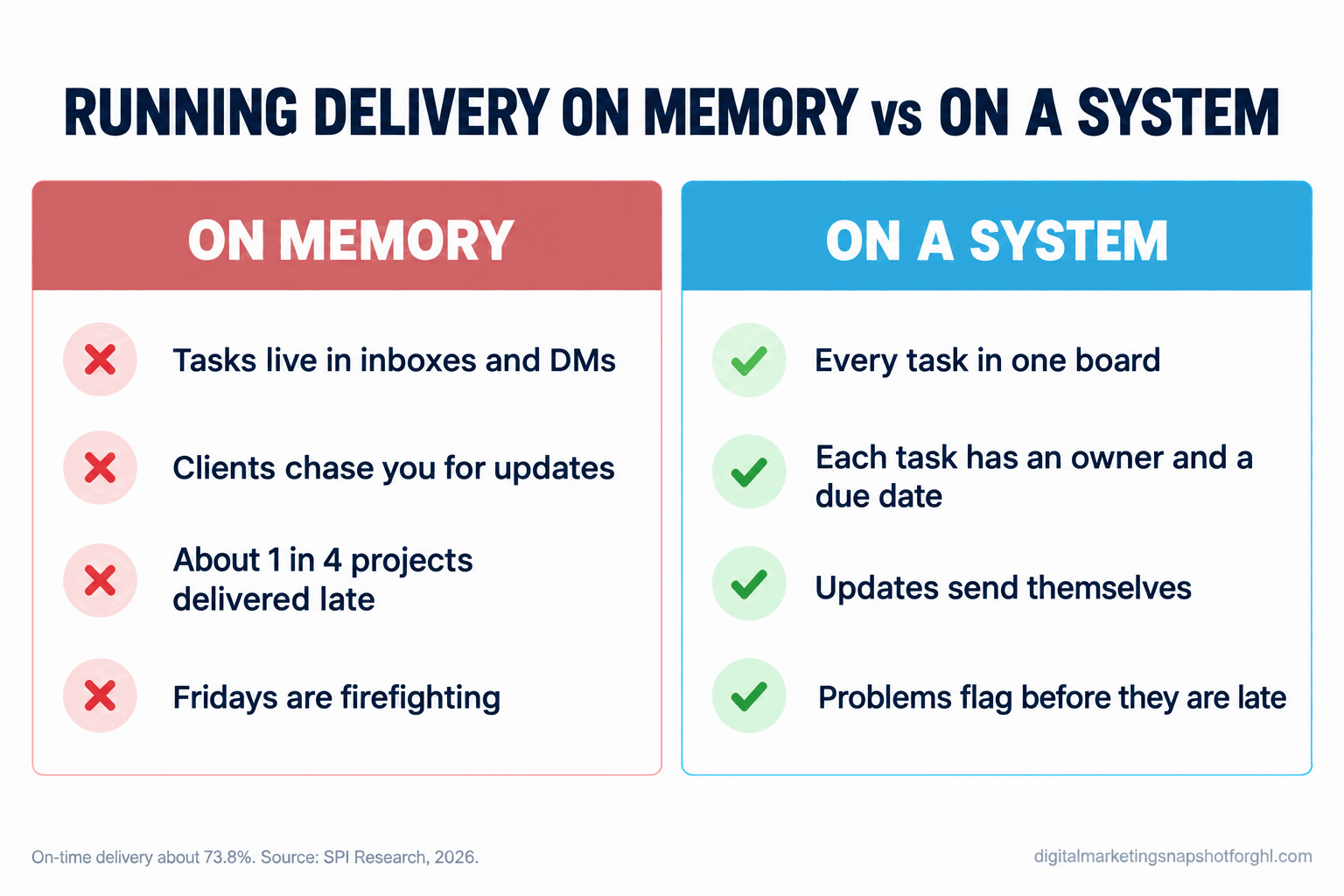
That is work slipping through the cracks, and it happens because tasks live in people’s heads, inboxes, and DMs instead of in one place everyone can see, so nothing flags them before a client does. You are running delivery on memory, and memory does not scale past a handful of clients. Below is what the slippage costs, why it is a systems problem, and a six-stage system that catches every task before a client has to chase it.
Table of contents
- What slipping through the cracks means
- What the slippage is costing you
- Why it is a systems problem
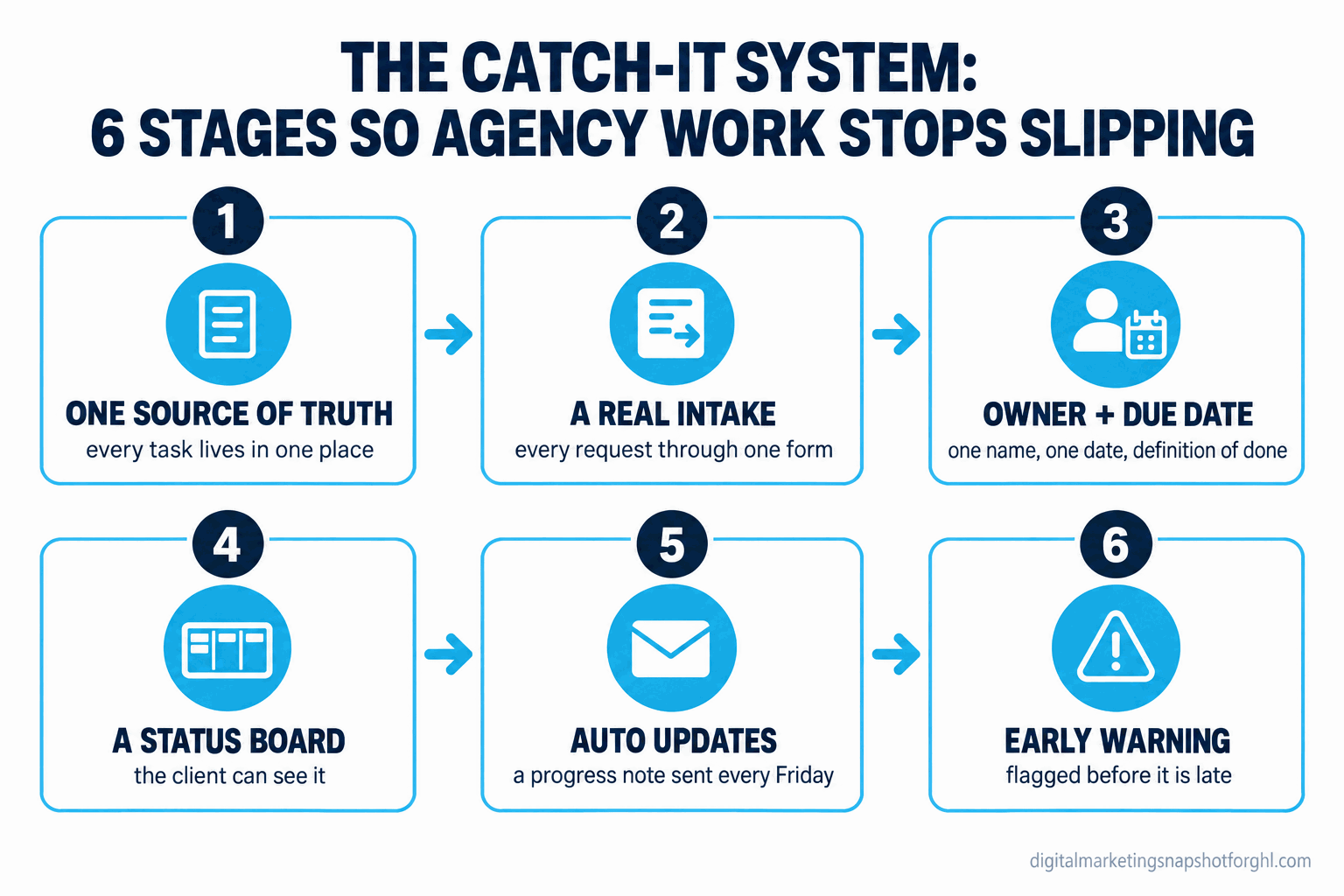
- The six-stage catch-it system
- Stage 1: one source of truth
- Stage 2: a real intake
- Stage 3: an owner and a due date
- Stage 4: a status board the client sees
- Stage 5: updates that send themselves
- Stage 6: early warning
- Run it for your size
- Compliance you cannot skip
- A quick word on tools
- Objections, answered
- FAQ
What slipping through the cracks means
A crack is any point where a piece of work exists but nothing is watching it. The client mentioned a revision on a call and it never became a task. An approval went out, no reminder chased it, and it stalled for nine days. None are big failures on their own, just small gaps between a thing being needed and a thing being tracked. Stacked across ten or fifteen clients, they are why Fridays feel like firefighting.
What the slippage is costing you
This shows up in your numbers this quarter.
You eat the cost of the miss. When the landing page is late, you do not bill for the scramble. You absorb the rush, the apology, and sometimes a discount. That unbilled rework is part of why billable utilization, the share of paid hours a client actually funds, fell to 66.4% in 2025, the lowest in SPI Research’s history across its benchmark of 509 services teams (Certinia). It was 73.2% in 2021 (Deltek).
You miss dates you promised. Across professional services, on-time delivery sits around 73.8%, so roughly one in four projects is late (SPI via Timelog). Each late deliverable chips at the trust that renews a retainer.
You pay the coordination tax. Asana’s study of more than 10,000 workers found about 60% of the day goes to “work about work,” the chasing and status-checking around the real job (Asana, 2019). It is self-reported and dated, but directionally right: the more work hides in inboxes, the more time you burn finding out where things stand.
Average billable utilization across professional services firms, 2021 to 2025. Unbilled rework sits inside that decline. Source: Deltek and Certinia on the SPI Research 2026 benchmark.
Why it is a systems problem
The instinct is to blame yourself or your team and try harder. It works for two weeks, then slides back, because effort does not fix a visibility gap. Think about how work enters your agency. A client texts you. Another emails your account manager. A third mentions something on a call. Each is a real task, and each enters through a different door and is tracked by a different person’s memory. There is no single list of what you owe, who owns it, and when it is due, so the only thing between a task and a crack is whether one busy human remembers it. Agencies that deliver on time narrowed the doors to one and let the system remember. Here is the build.
The six-stage catch-it system
Six stages, in order. Each closes a specific crack. You do not need all six live on day one, but skipping an early one makes the later ones leak.
Stage 1: one source of truth
Pick one place where every open task lives. Not your inbox, not Slack, not your head. One board, one project tool, or one CRM with tasks. It does not matter which, as long as everyone uses the same one. The rule is absolute: if a task is not in the system, it does not exist, and nobody is responsible for it.
How it breaks: half the team keeps working out of their inbox “just for quick stuff,” so you have two sources of truth, which is the same as none. Treat the inbox as a holding pen: each morning, anything real in it becomes a task.
Stage 2: a real intake
The biggest crack is the front door. Work that enters through a text or a “quick favor” never gets the rigor of work that comes through a form, so it vanishes first. Narrow the door to one structured intake that every new request goes through, from a client or from the team. Steal this one, and keep it to these fields so it takes 30 seconds:
In a tool like GoHighLevel, that form creates the task automatically, so the request lands in your system the moment it is submitted.
How it breaks: clients ignore the form and keep texting you. You cannot police that. Turn their text into an intake yourself in under a minute, then reply from the system. Over time the tracked channel becomes the normal one.
Stage 3: an owner and a due date
A task with no name belongs to everyone, so it belongs to no one. A task with no date is never late, so it waits forever. The non-negotiable rule: one named owner, one due date, one clear definition of done. Not a team, not “this week.” Steal this template, and if any field is blank the task is not ready to start:
That “definition of done” line is the quiet hero. Half of all slippage is a task everyone thought was finished and was not. Write it down and the argument disappears.
How it breaks: everything gets assigned to you, the safest default, and now you are the single point of failure, the exact trap in the founder-dependency problem. Push ownership down: if someone else can do it, their name goes on it.
Stage 4: a status board the client sees
Once every task has an owner and a date, put them on a board that shows status at a glance: not started, in progress, in review, waiting on client, done. Nobody should have to ask “where are we on this?” The answer is on the screen. Give the client a read-only window into their slice of it. It is the biggest reducer of status emails, because “any update?” is answered before it is asked. A client portal or shared pipeline view does it, and the reporting side is covered in building a white-label client reporting dashboard.
How it breaks: the board drifts out of date, people stop trusting it, and they go back to asking in Slack. A board nobody trusts is worse than none: it looks like coverage while leaking. Fix it with a five-minute daily habit: owners move their own cards, and anything stuck flags itself (that is Stage 6).
Stage 5: updates that send themselves
Most status communication is reactive: the client wonders, asks, and you scramble to reply. Flip it. The system sends a short progress note to each active client every Friday, before anyone thinks to ask. Here is the weekly update you can steal and automate:
Hi [First name],

Quick Friday update on your account:

Done this week: landing page live, 2 blog posts published
In progress now: the new email automation, due Wednesday
Waiting on you: approval on the homepage copy, link below

Nothing needs your attention unless the "waiting on you" line is filled in.
Reply here any time. [Your name]
And the one that saves the most deadlines, the “waiting on you” nudge, sent when an approval has sat two business days:
Hi [First name], one thing is holding up your [project]: we need your
sign-off on [the homepage copy]. Two minutes here: [link]. Then we ship.
How it breaks: the automation turns robotic and every client gets the identical generic message, so it reads like spam. Keep the wrapper automated but the content specific: the system fills in real task names from the board. If you automate client texts, read the compliance section first.
Stage 6: early warning
The first five stages make work visible. The last one makes the system watch it so you do not have to. Set rules that flag trouble before it becomes a missed date: a task due tomorrow that is still “not started” pings its owner, and a card stuck in “waiting on client” too long escalates to the account lead.
This is where automation earns its place. The SPI Research 2026 study found services firms that run AI and automation on more than 80% of their projects deliver 90.7% of them on time, versus 76.3% for firms using it on fewer than 20% (SPI via Teamwork). The gap is not magic. It is the system catching slippage early, without a human remembering to look.
Share of projects delivered on time, by how much a firm automates its work. Source: SPI Research 2026 AI study, reported by Teamwork.
How it breaks: you set too many alerts, everything pings, and the team learns to ignore all of it. Start with exactly two triggers, “due tomorrow and not started” and “waiting on client for three days.” An alert people act on beats ten they tune out.
Run it for your size
The six stages are the same, but how heavily you build each changes with size, because the cracks move as you grow. If you are weighing the next hire, pair this with agency capacity planning.
Solo operator or freelancer. You are the only owner, so Stage 3 is trivial and Stage 1 is everything. Your biggest crack is the gap between a client asking and you writing it down. Keep it simple: one task list, a fast intake you can fill from your phone, and the automated weekly update.
The 1-to-10 team. This is where slippage hurts most and where most agencies live. Work now crosses between people, so the cracks are the handoffs: the designer finishes, but the account manager does not know it is ready. Stage 4, the shared board, is your highest-value build, because it kills the “is this ready?” question. This is the band where removing yourself as the bottleneck decides whether you can grow, which ties into scaling without adding headcount.
The 20-plus shop. You likely have the tools already. Your problem is drift: multiple teams, inconsistent use, three ways to track the same thing. Your work is standardization, not new software. Pick one intake, one board structure, one definition-of-done format, and make them the only accepted way. Lean hard on Stage 6, because no human can watch every card at your scale.
Compliance you cannot skip
The moment you automate client-facing messages, especially texts, you step into rules that carry real penalties. Do not let the convenience of Stage 5 walk you into a fine.
A2P 10DLC. If you send SMS to clients’ customers through a US carrier, the campaign must be registered under A2P 10DLC, or carriers filter or block it. When you send on behalf of clients, you generally need a reseller or ISV arrangement so each client’s messaging is registered correctly, the step most small agencies get wrong. We break down the setup in A2P 10DLC registration for agencies. Register before you automate.
CAN-SPAM. Every automated client email needs a real physical address, a working unsubscribe, and an accurate subject line. The FTC’s CAN-SPAM rules apply per message, and penalties stack per email across a sequence.
Consent travels with the contact. When you message a client’s contacts, you need their consent, which your client usually collected. Make consent part of your intake and contract, so you never send to a list that was never opted in.
A quick word on tools
The system matters more than the software, but the wrong pricing model fights you as you grow. Here are the common options, with current public pricing.
| Tool | Good at | Rough 2026 price | The catch as you grow |
|---|---|---|---|
| ClickUp | Flexible task and project boards | Free tier; Unlimited ~$7/user/mo annual, Business ~$12 (ClickUp) | Per user, so cost rises with headcount, and it does not do client comms or CRM |
| AgencyAnalytics | White-label client reporting | ~$20 per client per month, annual (teardown) | Per client, so the bill grows exactly as you win work |
| GoHighLevel | CRM, tasks, forms, and client messaging in one | Flat plans from $97 to $497/mo (breakdown) | One system to learn, but it replaces several per-seat and per-client tools |
The catch-it system touches intake, tasks, the client portal, and automated updates at once. Spread those across a per-user and a per-client tool and you pay more every time you grow. One flat-priced system does not.
Objections, answered
“We already use ClickUp or a spreadsheet. Isn’t that enough?” A task tool is Stage 1, and that is real progress. But most agencies stop there, and the cracks that remain are the front door (Stage 2) and the client side (Stages 4 and 5). If requests still arrive by text, the board only tracks the work you remembered to log. The system is the full loop, not just the list.
“My team will feel micromanaged if everything is tracked.” The opposite happens. What feels like micromanagement is you asking “where are we on this?” five times a day. A board that answers that means you stop hovering. Frame it as “so nobody gets blamed for a dropped ball that was never written down.”
“I don’t have time to set this up, and I’m the reason things slip.” Start with the stage that buys back the most time fastest: Stage 5, the automated weekly update and the “waiting on you” nudge. It takes an afternoon and cuts the status emails and stalled approvals.
“A tool won’t fix a people problem.” Agreed, if it were a people problem. A task that was never written down is not a people failure, it is a process gap, and no amount of hiring closes a gap where work enters invisibly. The system lets good people stop relying on heroic memory.
The Thursday that does not happen
Go back to that 4:50pm message. With the system, it never arrives, because the landing page task was logged the moment the client asked, assigned to a named owner with a Monday due date, and flagged on Sunday when it was still “in progress.” That is the promise: not that you work harder, but that the system remembers so you and your team do not have to. Build the six stages in order, start with the one that hurts most, and let the system do the watching.
FAQ
Common questions about catching dropped agency work
Is work slipping through the cracks a discipline problem or a systems problem?
A systems problem. Trying harder helps for a week or two, then slides back, because you cannot stay on top of work you cannot see in one place. The fix is to route every request into one system where each task has an owner, a due date, and a definition of done.
What is the single fastest fix if I only have one afternoon?
Turn on automated client updates: a short weekly progress note to each client, and an automatic nudge when an approval has sat two business days. It is the quickest stage to build and it cuts the two biggest time drains, status emails and stalled approvals.
Can a spreadsheet work, or do I need special software?
A spreadsheet can be your single source of truth and beats tracking work in your head. It falls short on the client-facing stages: a shared status view, automated updates, and early-warning triggers are hard to run from one. A CRM or project tool that also handles client messaging covers the whole loop.
How does this relate to A2P 10DLC and SMS compliance?
The moment you automate client-facing texts, US carrier rules apply. SMS campaigns must be registered under A2P 10DLC, and when you message on behalf of clients you usually need a reseller or ISV setup so each client's traffic is registered correctly. Register before you automate, or carriers filter your messages. Automated emails must also follow the FTC's CAN-SPAM rules.
We're a solo shop. Is a full system overkill?
No, but you build it lighter. Your only owner is you, so the critical stages are one source of truth and a fast intake so nothing verbal gets lost, plus the automated weekly update. You can skip a client portal at first and still close most of the cracks.