
To set up an AI receptionist for your San Diego marketing agency, you follow seven steps: map your call flows, write a qualifying script, pick a voice and persona, connect your calendar, hand the lead off to your CRM, add an after-hours SMS fallback, then test and measure. Done right, it answers every inbound call in seconds — day, night, or mid-pitch — so a prospect never lands in voicemail and dials the agency listed right below you on Google. This playbook walks each step in order, with the sourced speed-to-lead math behind why it matters and exactly what to configure.
I spent eight years running fulfillment for a busy SEO and PPC shop before going independent, and the leakiest pipe I ever found wasn’t in a client campaign — it was our own front desk. We paid to generate the calls, then missed a chunk of them because everyone was heads-down in delivery. An AI receptionist is how you plug that hole for a flat monthly cost instead of a $37,230-a-year hire. Here’s the operator’s version of the setup.
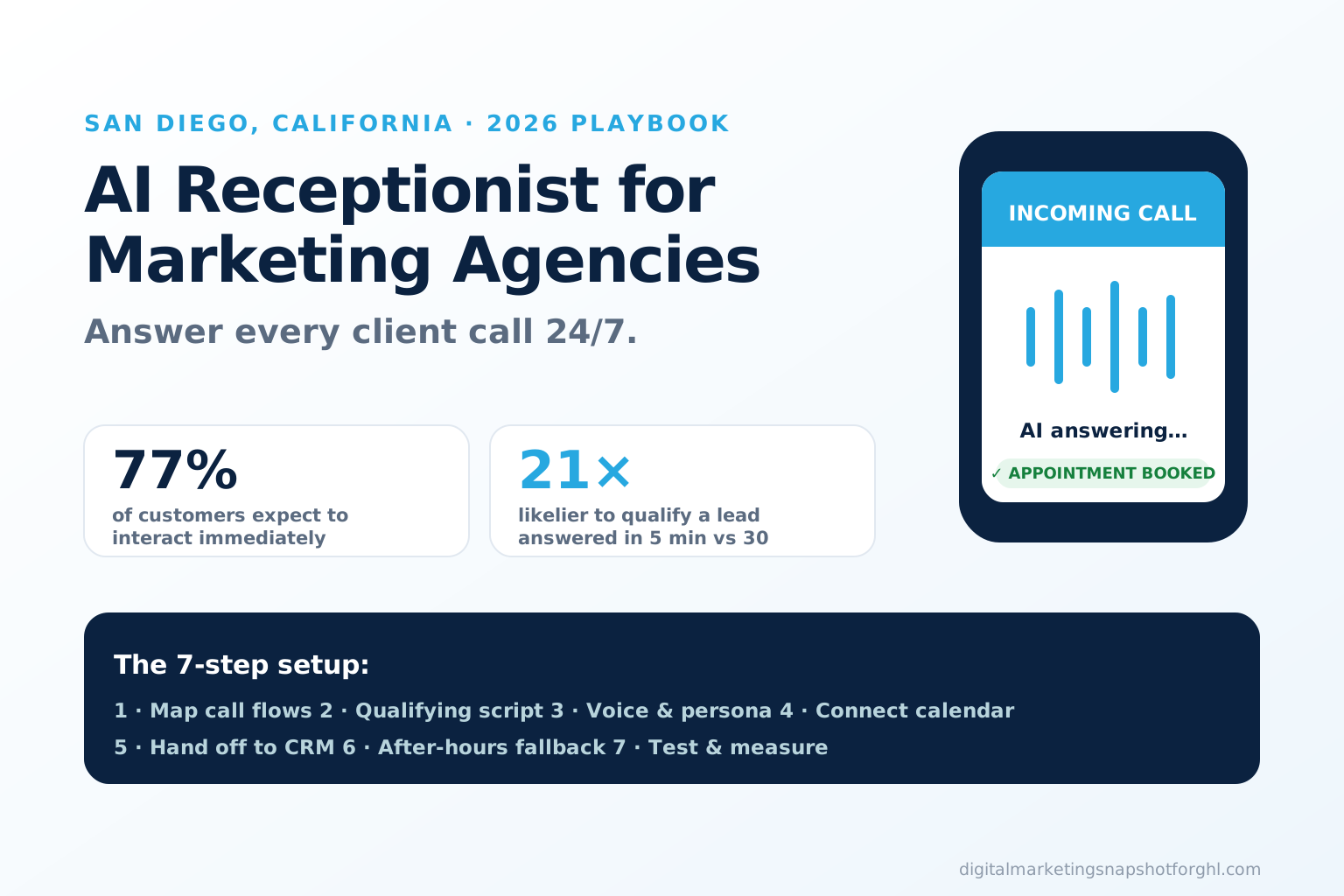
Table of contents
- What an AI receptionist actually does for an agency
- Why a San Diego agency can’t afford a missed call
- The 7-step AI receptionist setup playbook
- AI receptionist vs voicemail vs a human hire
- What it costs and how fast it goes live
- Setup mistakes to avoid
- FAQ
What an AI receptionist actually does for an agency
An AI receptionist is a natural-sounding AI voice agent that answers your inbound calls, holds a real conversation, asks your qualifying questions, books the appointment onto your calendar, and logs the lead into your CRM — automatically, 24/7. It is not a phone tree and not a voicemail box. The caller talks; it responds, in your agency’s greeting and tone, and either books them or routes them to a human with full notes attached.
For a marketing agency it earns its keep in two places. First, on your own line, catching new-business calls that come in while you and your team are buried in client work. Second, as a service you resell — deploy the same agent on a client’s number, brand it as your own, and bill it inside a monthly retainer. Because it ships in one GoHighLevel snapshot alongside your CRM, SMS, and booking automations, you can roll it across an entire client roster without building anything from scratch.
The point isn’t to replace a great human team. It’s to make sure the calls your team can’t physically get to — after hours, over a weekend, during a pitch — still get answered, qualified, and booked instead of lost.
Why a San Diego agency can’t afford a missed call
San Diego is a crowded, competitive agency market. Nationally there were 87,197 digital advertising agencies in the U.S. in 2025, up 16.3% year over year (IBISWorld), and California carries an outsized share of them. When a prospect Googles “marketing agency near me,” your competitor is one tap down the list. The agency that answers first usually wins the conversation — and most agencies don’t answer fast enough.
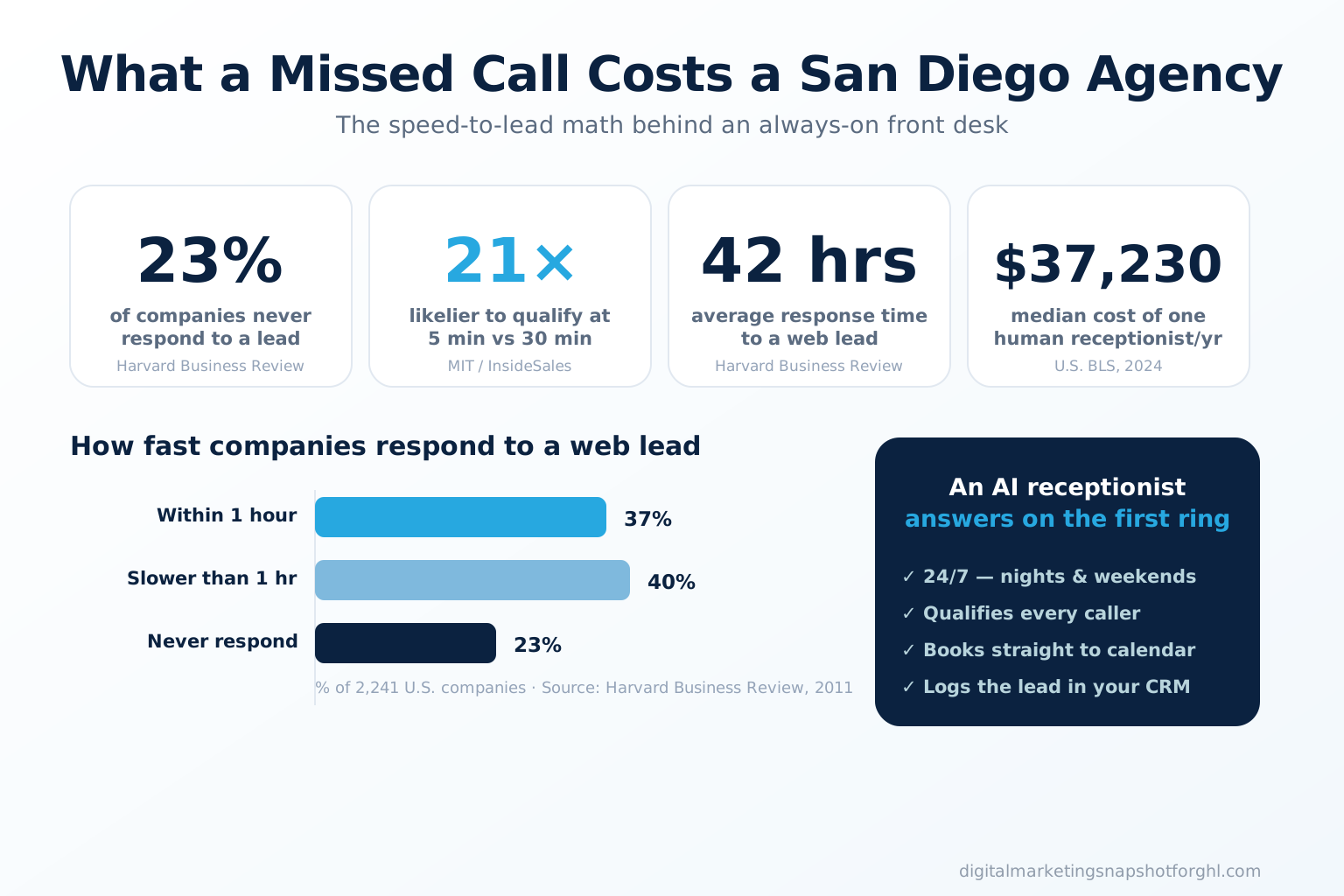
The speed-to-lead research is brutal and consistent. Harvard Business Review audited 2,241 U.S. companies and found the average first response to an inbound web lead took 42 hours, only 37% responded within an hour, and 23% never responded at all (HBR). The MIT/InsideSales Lead Response Management Study — the origin of the “5-minute rule” — found that contacting a lead within 5 minutes instead of 30 makes you about 100x more likely to connect and 21x more likely to qualify them (MIT / InsideSales).
How fast companies respond to an inbound web lead, % of 2,241 U.S. companies. Source: Harvard Business Review, 2011.
Two more facts make the phone specifically worth defending. 77% of customers expect to interact with a company immediately when they reach out (Salesforce), and inbound phone calls convert to roughly 10–15x more revenue than web-form leads (BIA/Kelsey via Invoca). The phone is still the single most-preferred way Americans contact a business — 35% name it their top channel (YouGov). A missed call isn’t a missed contact; it’s a missed, closer-ready buyer. This is the same speed-to-lead principle you already preach to clients — it just applies to your own front door too.
The 7-step AI receptionist setup playbook
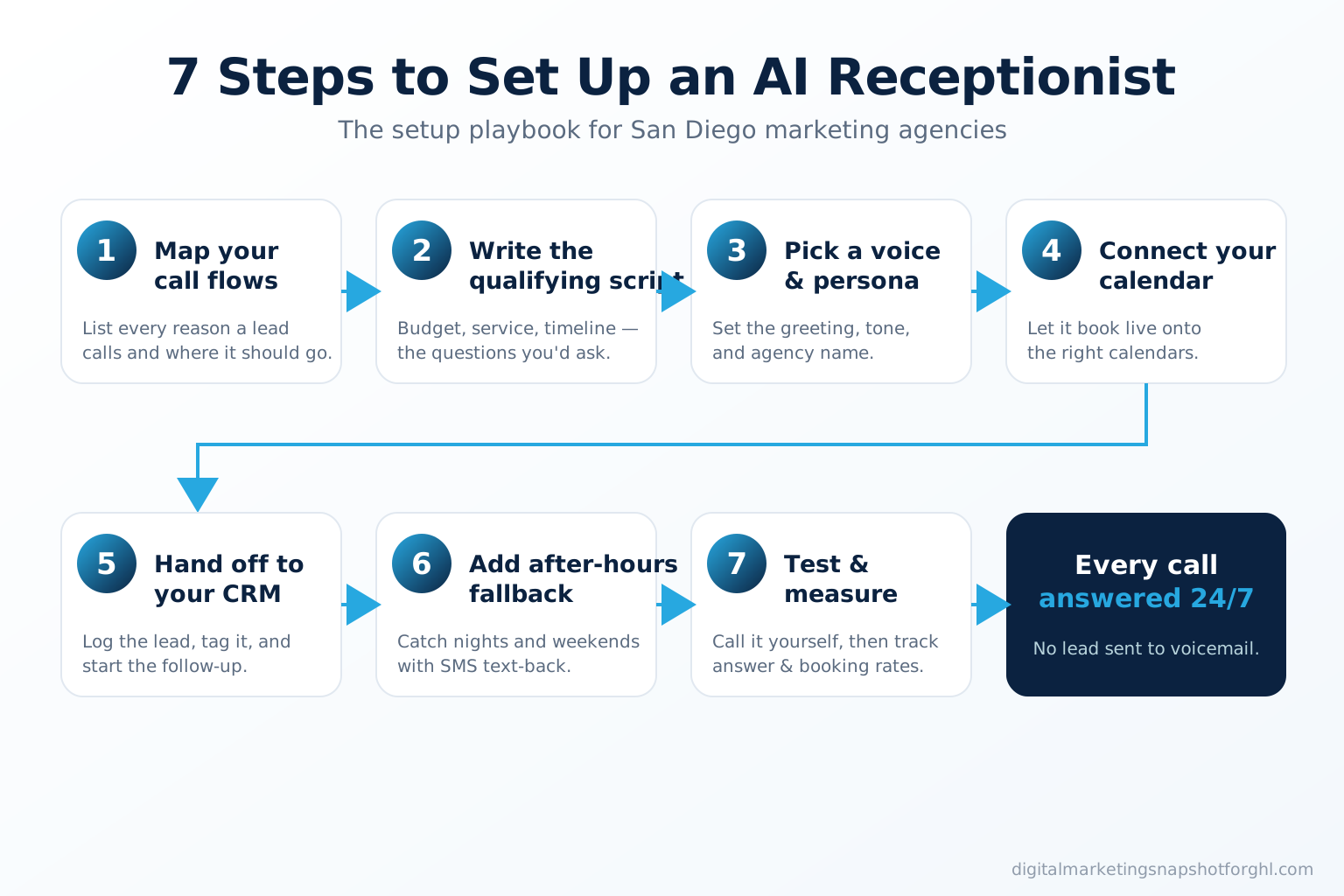
Here’s the actual setup. Follow it in order; each step feeds the next.
Step 1 — Map your call flows
Before you configure anything, write down every reason someone calls your agency and where that call should end up. For most shops there are four buckets: new-business inquiries (book a discovery call), existing-client questions (route or take a message with context), vendor/spam (deflect), and billing (route to you). Sketch the decision tree on one page. The AI receptionist can only be as smart as the flow you hand it, so this fifteen-minute exercise is the highest-leverage part of the whole build.
Step 2 — Write the qualifying script
Decide the three or four questions that separate a real prospect from a tire-kicker: budget range, the service they need (SEO, PPC, social, web), their timeline, and how they found you. Write the exact opening line too — something like “Thanks for calling [Agency], this is Ava — are you looking for help with a new project or an existing one?” Keep it conversational and short. These answers become CRM fields, so define them now: they’re what let you prioritize follow-up and prove attribution later.
Step 3 — Pick a voice and persona
Choose the voice, name, tone, and greeting so the agent sounds like your brand, not a generic bot. Give it a name, set whether it’s warm-casual or crisp-professional, and load a few fallback lines for questions it can’t answer (“Great question — I’ll have a strategist call you back within the hour, does that work?”). The goal isn’t to trick anyone into thinking it’s human; it’s to answer instantly and helpfully so the caller stays on the line instead of hanging up.
Step 4 — Connect your calendar
Point the agent at the calendars it’s allowed to book — your discovery-call calendar, or a specific strategist’s. Set availability rules, buffer times, and time zone (Pacific for San Diego), and turn on confirmation plus reminder messages. This is the step that turns a conversation into a booked call: the agent checks live availability and drops the appointment straight onto your calendar while the prospect is still on the phone. Pair it with appointment reminder automation so the booking actually shows up.
Step 5 — Hand off to your CRM
Every call should create or update a contact record with the transcript, the qualifying answers, a lead tag, and a pipeline stage. In GoHighLevel this is native: the AI Caller writes the lead into the CRM and kicks off a workflow — an instant confirmation text, an internal notification to the right team member, and a nurture sequence if they didn’t book. No lead sits in a notebook or a missed-call log. Everything is trackable, which is what makes the ROI provable.
Step 6 — Add an after-hours SMS fallback
Even the best voice agent occasionally hits a caller who won’t talk to it or a rare edge case. Your safety net is a missed-call text-back: the instant a call ends without a booking, an automated SMS goes out — “Sorry we missed you! This is [Agency] — want me to grab a few details and get you booked?” Layering SMS automation under the voice agent means a lead has to actively ignore two outreach attempts to slip away, and nights and weekends stay covered.
Step 7 — Test and measure
Call your own line — from a cell, after hours, with a messy real-world question — and listen. Tune the script where it stumbles. Then watch three numbers weekly: answer rate (should approach 100%), booking rate (calls that became appointments), and speed-to-first-touch. If bookings lag, the fix is almost always the script or the calendar rules, not the AI. Treat the receptionist like any campaign: measure, adjust, repeat.
AI receptionist vs voicemail vs a human hire
Most San Diego agencies handle overflow calls one of three ways today. Here’s the honest side-by-side.
Three ways to answer your agency's calls
| Plan | Voicemail / callback | Human receptionist | AI receptionist (in the snapshot)Recommended |
|---|---|---|---|
| Price | Free — but leaks leads | $37,230/yr median | Flat monthly |
| Feature 1 | Caller hangs up and dials the next agency | One shift, one call at a time | Answers 24/7 in seconds |
| Feature 2 | No qualifying, no booking | Sick days, turnover, training | Qualifies every caller |
| Feature 3 | Nights & weekends fully missed | No nights or weekend coverage | Unlimited calls at once |
| Feature 4 | Nothing logged to your CRM | Books to calendar if trained | Books & logs to GoHighLevel automatically |
| Feature 5 | Slow, manual follow-up | Weeks to hire and onboard | Live within 24 hours |
| See the AI Caller → |
The cost gap is the part agencies underestimate. A human receptionist earns a median $37,230 a year before benefits and taxes (U.S. Bureau of Labor Statistics) and still can’t cover a Saturday or two calls at once. Here’s how the missed-call math and the alternatives stack up:
This isn’t a fringe bet, either. The AI voice-agents market is projected to grow from $2.54B in 2025 to $35.24B by 2033 (Grand View Research), and Gartner predicts agentic AI will autonomously resolve 80% of common customer-service issues by 2029, cutting operational costs 30% (Gartner).
Global AI voice-agents market size, USD billions. Source: Grand View Research, 2025 (39.0% CAGR, 2026–2033).
What it costs and how fast it goes live
Standalone AI answering services bill per minute or per call, which gets expensive fast as your volume grows. The snapshot approach is different: the AI Caller is built into the one-time $997 Digital Marketing Snapshot with no monthly fee from us — you only carry your GoHighLevel subscription and usage. Compared to a $37,230 hire, the payback is measured in a single recovered client, not months.
Timeline is short because you’re not building from zero. The snapshot installs in your GoHighLevel account and the AI Caller is answering calls within 24 hours. You spend an hour on Steps 1–3 (flows, script, voice), point your number at it, and go live. Full pricing and what’s included is on the pricing page, and you can see it live in a 20-minute demo before you commit.
Setup mistakes to avoid
A few things that quietly sink otherwise-good deployments:
- Skipping Step 1. If you don’t map call flows first, the agent guesses — and guesses wrong. Fifteen minutes here saves weeks of frustration.
- A bloated script. Four qualifying questions, not twelve. Every extra question is a chance for the caller to bail. Capture the essentials, book the call, and let a human go deep.
- No CRM handoff. An AI that answers but doesn’t log the lead just moved the leak downstream. Wire Step 5 before you launch.
- Set-and-forget. Review the transcripts weekly for the first month. The biggest gains come from tuning the script against real calls, exactly like optimizing an ad set.
- No after-hours fallback. Voice plus missed-call text-back is belt-and-suspenders. Run both.
For the deeper “why it works” case — the speed-to-lead economics and the cost breakdown — see our companion piece, AI receptionist for marketing agencies in Miami.
FAQ
AI receptionist setup for San Diego agencies — quick answers
How do I set up an AI receptionist for my marketing agency?
Follow seven steps: map your call flows, write a short qualifying script, pick a voice and persona, connect the calendar it can book, hand each lead off to your CRM, add an after-hours SMS fallback, then test with real calls and measure answer and booking rates. Inside a GoHighLevel snapshot the AI Caller ships pre-built, so setup is configuration rather than development and it goes live within 24 hours.
How long does it take to go live?
About a day. The snapshot installs the AI Caller in your GoHighLevel account, and the only hands-on work is Steps 1 to 3 — mapping your call flows, writing the qualifying questions, and setting the greeting and voice. Point your phone number at it and it starts answering.
How much does an AI receptionist cost versus hiring someone?
A human receptionist earns a median 37,230 dollars a year before benefits and taxes (U.S. BLS, 2024) and still cannot cover nights, weekends, or two calls at once. The AI Caller is included in the one-time 997-dollar Digital Marketing Snapshot with no monthly fee from us — you only carry your GoHighLevel subscription and usage.
Will callers know it is an AI?
It holds a natural conversation rather than a robotic phone tree, and you set the name, greeting, and tone so it sounds like your agency. The goal is not to deceive anyone; it is to answer instantly and helpfully so the caller never rolls to voicemail and dials a competitor.
Why does answering fast matter so much?
The MIT and InsideSales study found that contacting a lead within 5 minutes instead of 30 makes you about 100x more likely to connect and 21x more likely to qualify them, and Harvard Business Review found the average company takes 42 hours to respond while 23% never respond at all. An AI that answers on the first ring hits that 5-minute window on every call, at any hour.
Can a San Diego agency resell the AI receptionist to its clients?
Yes. Deploy the same agent on a client's number, brand it as your own, and bill it inside a monthly retainer. Because it ships in one GoHighLevel snapshot alongside the CRM, SMS, and booking automations, you can roll it across your whole client roster without building anything from scratch.
Written by Marisa Quintero, Agency Operations Strategist. Marisa spent eight years running fulfillment for a 40-client SEO and PPC shop before going independent, and writes about the boring, margin-saving half of agency life — onboarding, reporting cadences, and the automations that hold up at scale.
Related reading: AI receptionist for marketing agencies in Miami · Speed-to-lead for agencies · Missed-call text-back in GoHighLevel · What is a GoHighLevel snapshot?