
You pick ClickUp because it is cheap and everyone on Reddit swears by it. Nine dollars a seat. You move the task list over on a Sunday, feel clever for a week, and then the real bills start arriving one at a time. The client wants a live dashboard, so you add a reporting tool. Leads need texting back, so you add a messaging tool. You want reviews, so you add another. By the end of the quarter the nine-dollar tool is the smallest line on a page of line items.
Here is the answer up front. ClickUp is genuinely cheap as a project manager, and genuinely incomplete as an agency platform. It does no client-facing reporting dashboard, no two-way SMS, no review collection, no client portal, and no call tracking, so an agency ends up buying those around it. Once you add the reporting and messaging tools a client-facing agency actually needs, the “cheap” ClickUp stack runs several hundred dollars a month for a small team and climbs with both your headcount and your client count. The sticker is real. It is just not the whole number.
What this teardown covers
- What ClickUp actually costs in 2026
- The sticker that keeps moving
- The five things ClickUp does not do for an agency
- The real stack math: solo, 10-person, 20-plus
- How the ClickUp-as-agency-hub plan breaks
- The compliance cost nobody prices in
- The flat-platform fix
- Objections
- FAQ
What ClickUp actually costs in 2026
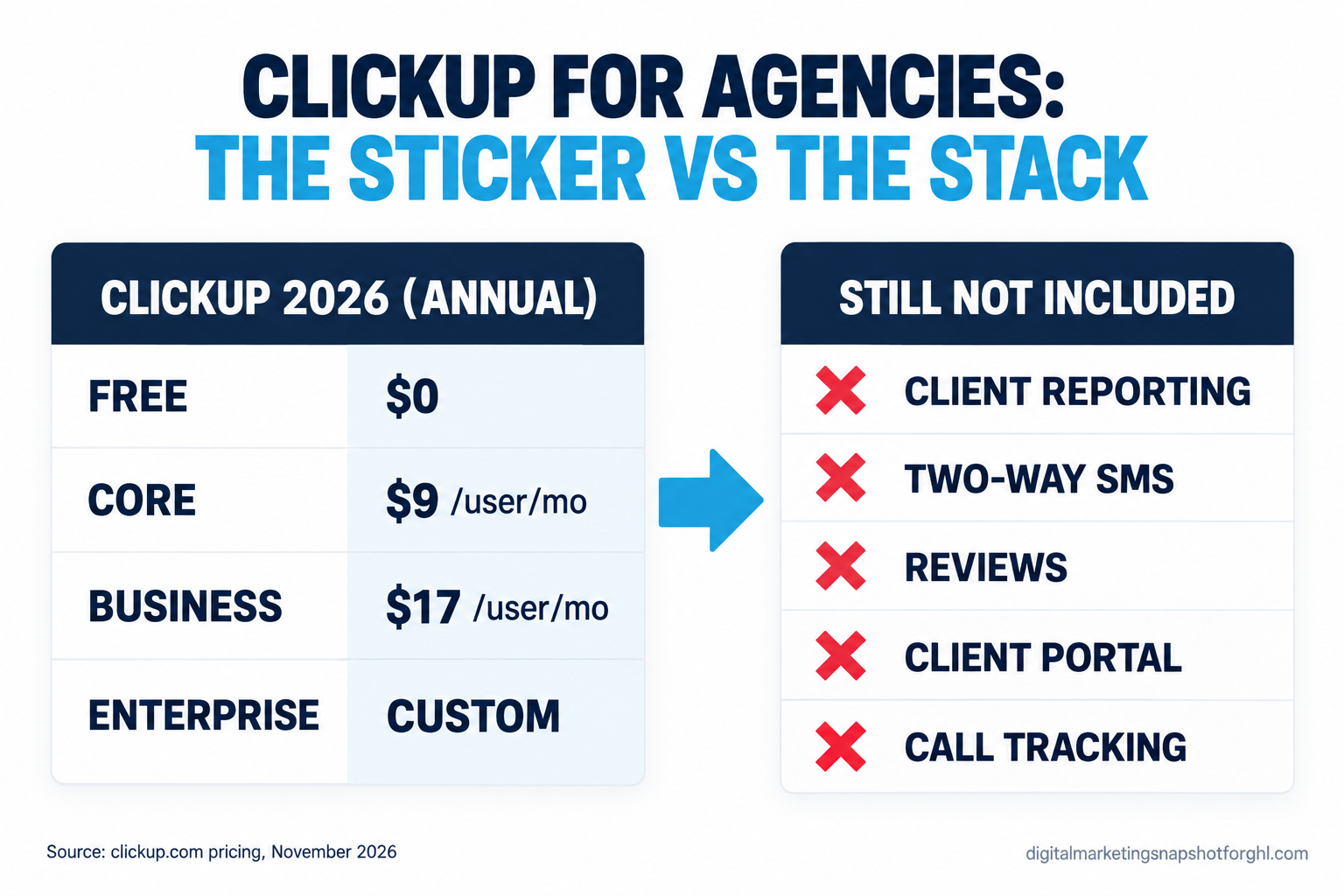
Start with the good news: ClickUp publishes its prices, which already puts it ahead of the agency tools that hide everything behind a demo. On annual billing, the tiers listed on ClickUp’s pricing page in November 2026 are:
ClickUp plan tiers, annual billing (November 2026)
| Plan | Free Forever | Core | BusinessRecommended | Enterprise |
|---|---|---|---|---|
| Price | $0 | $9/user/mo | $17/user/mo | Custom quote |
| Feature 1 | Core tasks and docs | Everything in Free | Automations, dashboards | Advanced permissions |
| Feature 2 | Limited storage | Unlimited storage | Google SSO, unlimited teams | White-label (ClickUp's own) |
| Feature 3 | No client reporting | No client reporting | No client reporting | No client reporting |
| The agency tier |
A few things to notice before you budget around that $9.
First, the plan a client-facing agency actually needs is Business at $17, not Core at $9. Automations, dashboards, Workload and Timeline views, and Google SSO all live on Business. Core is fine for a solo freelancer tracking their own tasks, but the moment you have a team and want automated handoffs and real dashboards, your per-seat number nearly doubles.
Second, ClickUp folded its AI into every plan in 2026. Every paid tier now ships with ClickUp Brain and a monthly credit allowance, and when you burn through those credits, more cost $10 per 10,000: a usage meter sitting on top of your flat per-seat price, and a variable cost you cannot fully predict at signup. There is also a Max tier at $100 per user per month for heavy AI use, which tells you where the roadmap points.
The sticker that keeps moving
The reason “ClickUp is nine dollars” sticks in people’s heads is that it used to be true for the useful tier. For years the mid plan most agencies ran, then called Unlimited, sat at $7 a seat, and Business sat at $12. In the 2026 repricing, the entry paid plan became Core at $9 and Business climbed to $17, with AI bundled in to justify the jump.
If you still quote the old numbers, you are underbudgeting. Ten seats on the old $12 Business plan was $120 a month. Ten seats on today’s $17 plan is $170, a 42% jump on the exact plan a growing agency needs, and it happened quietly, the way per-seat increases always do.
The five things ClickUp does not do for an agency
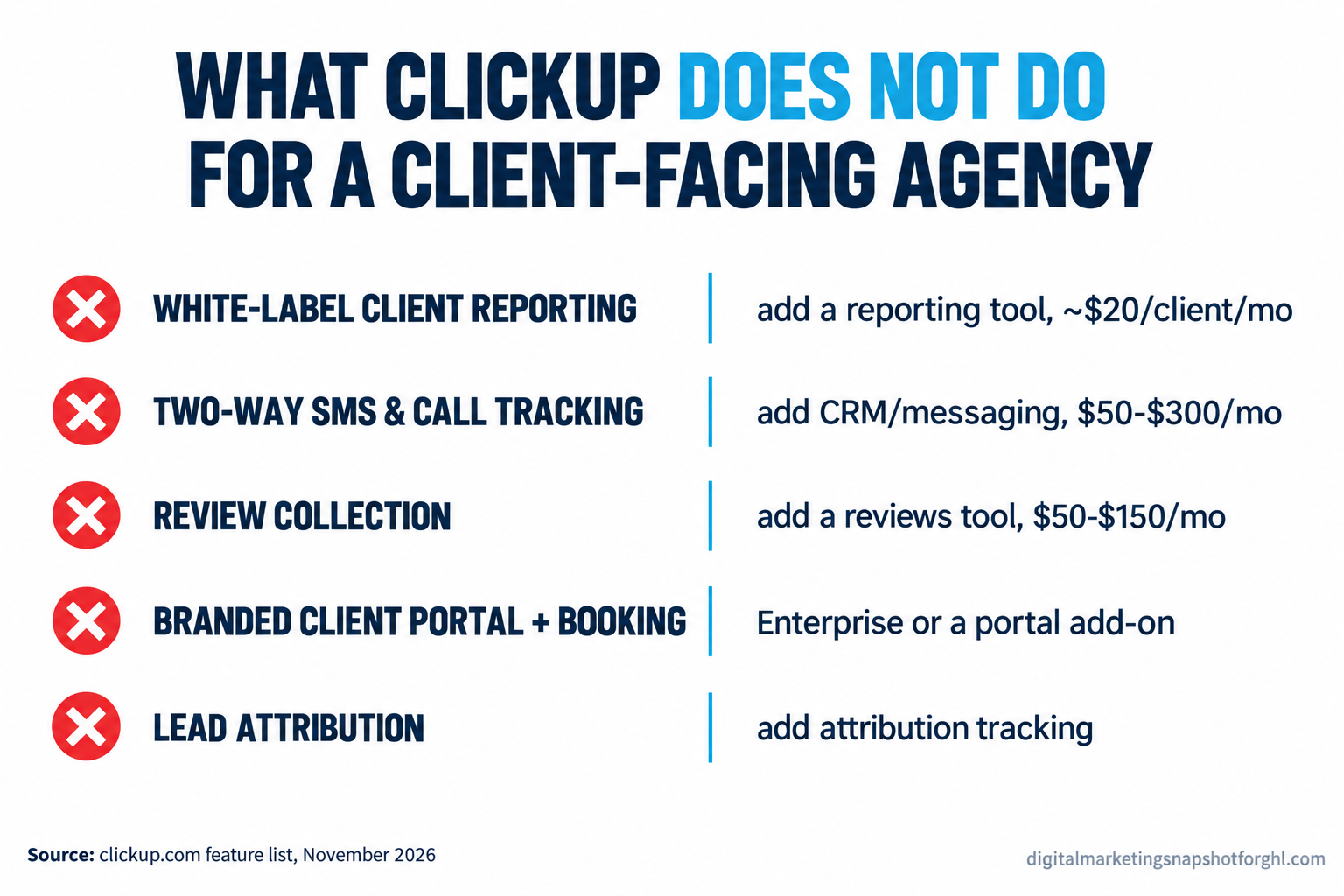
This is the part that decides your real bill. ClickUp is a very good internal work tool. It is not a client-facing agency platform, and the gap between those two things is a shopping list.
1. Client reporting dashboards
This is the big one. Your clients do not care about your task board. They care about the dashboard that shows leads, rankings, ad spend, and ROI with their logo on it. ClickUp has internal dashboards for your team, but nothing a client logs into to see their marketing results.
So agencies bolt on a reporting tool, commonly AgencyAnalytics, which charges $20 per client per month on annual billing per its pricing page, with none included. Ten clients is $200 a month, twenty is $400: the tool that makes you look good gets more expensive with every client you add. Full breakdown of that trap: AgencyAnalytics alternatives that do not charge per client.
2. Two-way SMS and a real CRM pipeline
ClickUp has a CRM template. It is a database, not a communication system: no two-way texting, no call tracking, no missed-call text-back, no number to send from. For an agency that captures leads for clients, that is a hole where speed-to-lead should be, and the agencies that win leads answer in seconds, not hours. (New to this? Start with speed-to-lead for agencies.) So you add a messaging and CRM layer, another $50 to $300 a month, and a second place your client data lives and has to stay in sync.
3. Review collection and reputation
If you sell reputation management, or just want your own agency to have reviews, ClickUp does nothing here: no automated review request after a win, no routing of unhappy responses before they go public, no reply automation. That is another tool, usually $50 to $150 a month, and it carries a compliance tail we will get to.
4. A branded client portal and booking
Clients want one place to see progress, approve work, book a call, and find their reports. ClickUp can share a view, but it is ClickUp’s interface, not your brand, and it is not a booking system. A white-label portal means paying for ClickUp Enterprise or bolting on a portal and a scheduler. More logins, more money.
5. Call and lead attribution
When a client asks “which campaign produced this lead,” you need tracking that ties a conversion back to a source. ClickUp has none of that. It tracks your tasks, not your clients’ leads, so attribution is its own tool and its own bill, and the number has to be defensible enough to prove ROI.
The real stack math: solo, 10-person, 20-plus
Now put it together. The numbers below are modeled from the published per-unit prices above (ClickUp Business at $17 a seat, reporting at $20 per client, a messaging or CRM layer, a review tool), so treat them as a realistic model, not a quote for one bundle. Your exact figure depends on which tools you pick, but the shape does not change: the ClickUp line is small, the stack around it is not.
Solo operator, five clients. One Business seat ($17) plus five clients of reporting at $20 ($100) is about $117 a month, leaning on free tiers for messaging. You still have no real two-way messaging or attribution, and the $9 you came for is nowhere in that number.
Ten-person team, twenty clients. Ten seats ($170) plus twenty clients of reporting ($400) plus a CRM and messaging layer (about $297) plus a review tool (about $99) lands near $966 a month across four logins. The ClickUp line is under a fifth of that. The tools you added to make ClickUp usable for client work are the other four-fifths.
Twenty-plus team, forty clients. Twenty seats ($340) plus forty clients of reporting ($800, before any volume discount) plus a heavier messaging layer (about $497) plus reviews and a portal (about $150) is roughly $1,787 a month, and every new hire and client nudges it up again.
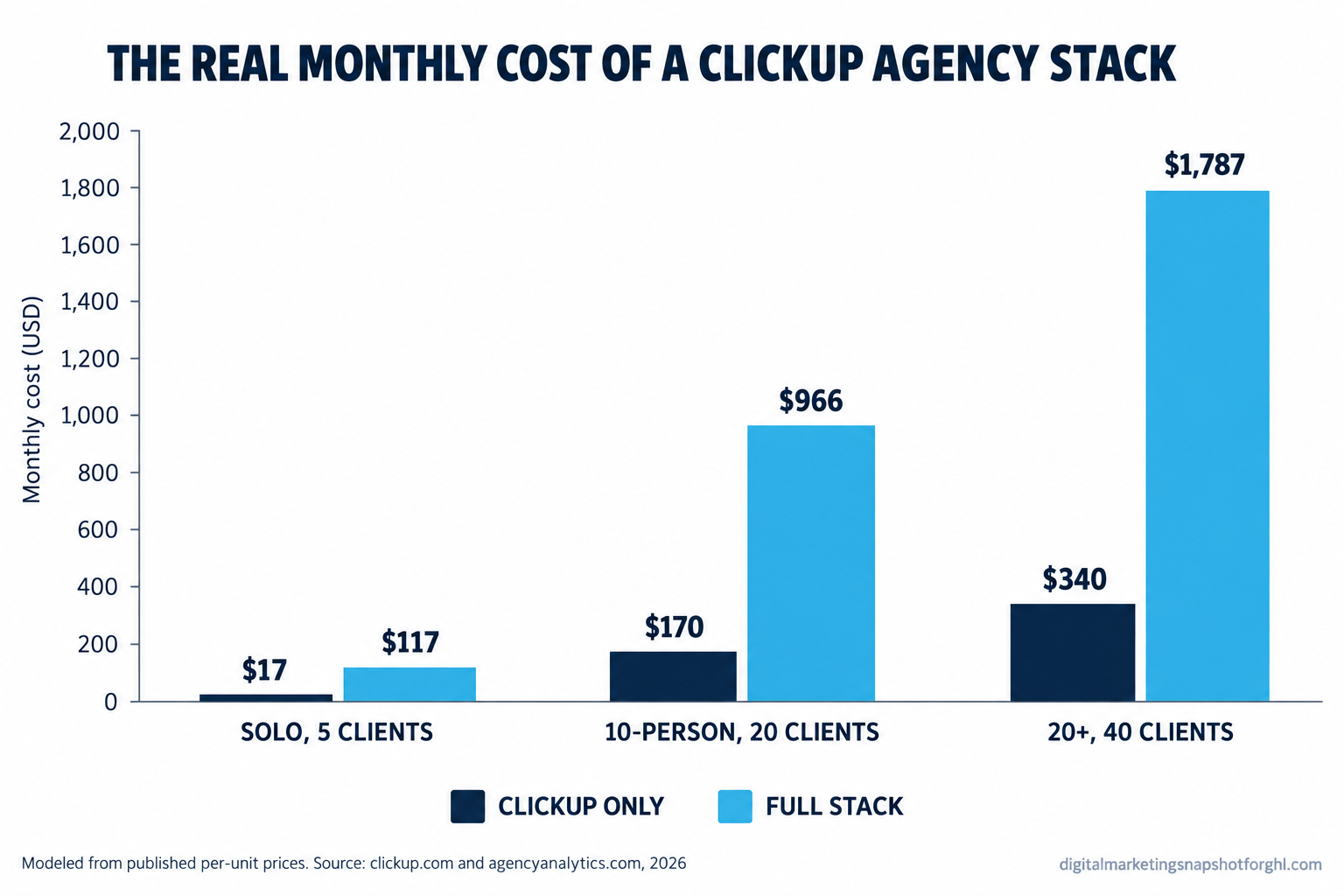
Here is the same story as a chart: the ClickUp seat cost you planned for, against what the agency stack actually costs once you add the client-facing tools.
Monthly cost in USD. Stack modeled from published per-unit prices. Source: clickup.com and agencyanalytics.com pricing, November 2026.
The problem is not any single price. It is the shape. ClickUp bills per seat, so it grows when you hire. Your reporting tool bills per client, so it grows when you win business. Stack those two curves and your software cost climbs on both axes at once, right as agency margin is already getting squeezed. That squeeze is measurable: billable utilization across professional services firms fell to 66.4% in 2025, the lowest in the 19-year history of SPI Research’s benchmark, built from 509 firms (Deltek summary of the 2026 SPI Research Professional Services Maturity Benchmark). When billable hours shrink, a bill that grows with both is the last thing you want.
How the ClickUp-as-agency-hub plan breaks
Price is only half the story. The other half is what happens when you try to force a project manager to be the hub of a client-facing agency. These are the failure modes I see most often.
The data splits and never reconciles. Tasks are in ClickUp, contacts in the CRM you bolted on, reporting data in the reporting tool, reviews somewhere else. Nothing shares an ID, so when a client asks a simple question you open three tabs and the numbers never quite match. Fix: pick one system of record for client data and treat everything else as a view, or you spend your week being a human integration.
Automations stop at the ClickUp wall. ClickUp automations are great inside ClickUp. They cannot text a lead, request a review, or update a client dashboard, because those tools live outside. So your “automated” workflow has a manual hop where someone copies a status into another tool, and that hop is where things get dropped. Fix: map every workflow end to end and find every point where a human moves data by hand.
AI credits run out mid-month. Because Brain is metered, a team that leans on AI can burn the monthly allowance and either stop using it or start paying $10 per 10,000 extra credits. Fix: watch credit usage for the first two months and budget the overage as a real line.
Per-seat creep punishes hiring. Every person you add is another $17, forever, whether or not they touch client work. Contractors, VAs, and part-timers all count. Fix: audit seats quarterly and pull anyone who has not logged in, because dormant seats are the quietest leak in the stack.
The compliance cost nobody prices in
The bolt-on stack carries a bill that never shows up on any pricing page: compliance. The moment you add a messaging tool and start texting leads on a client’s behalf, you inherit rules a task manager let you ignore.
For SMS, US carriers require A2P 10DLC registration, and when you send on behalf of clients you generally need a reseller ID so each client is registered as its own brand rather than hidden under yours (Vonage’s reseller guidance, Twilio’s A2P 10DLC overview). Get it wrong and carriers filter or block your clients’ texts, a fulfillment failure you are paying a tool to cause. Full walkthrough: A2P 10DLC registration for agencies.
For email, every send on a client’s behalf is governed by CAN-SPAM. For reviews, the FTC’s revised Endorsement Guides (2023) ban fake and incentivized reviews and remove the old “results not typical” defense (FTC Endorsement Guides), so a review workflow has to ask the right way or it becomes a legal problem. None of this is in the sticker price of the tools you bolted on, and we cover the review rules plainly in FTC review rules for agencies.
The flat-platform fix
The structural problem with the ClickUp stack is that two of its biggest lines bill on the two axes you most want to grow: seats and clients. The fix is not a cheaper project manager. It is a platform where the price stops moving when you add either.
That is the case for a flat platform like GoHighLevel, which publishes plans at $97, $297, and $497 a month and bundles the CRM, two-way SMS, review requests, client-facing reporting dashboards, a booking calendar, and a white-label portal into one fee that does not change when you sign your eleventh client. (GoHighLevel publishes its pricing here. That is our affiliate link, and we may earn a commission if you start an account through it.) Against the 10-person stack above, that is roughly $966 a month across four tools versus a flat $297 that replaces four of them. Plenty of agencies keep ClickUp for internal tasks and move the client-facing work onto one flat platform.
Objections
“ClickUp is still way cheaper, though.” Cheaper at the seat, yes. Not cheaper at the stack. The honest comparison is not ClickUp versus a platform, it is ClickUp-plus-reporting-plus-messaging-plus-reviews versus a platform, because that is what it takes to run client work. Compare the totals, not the stickers.
“I already have ClickUp dialed in and my team loves it.” Then keep it for internal project management, where it is genuinely strong. The argument is not “rip out ClickUp,” it is “stop making a task manager do client reporting, messaging, and reviews, because that is where the money leaks.” Use each tool for what it is good at.
“Isn’t a flat platform just hiding the per-client cost somewhere else?” Fair question, so check it. A flat platform’s price is published and does not change with client count, which you can verify before you buy. Per-client and per-seat tools, by design, cost more as you grow. The difference is structural, not marketing.
“Switching sounds like a nightmare.” The subscription is the easy part. The real cost is rebuilding your dashboards, templates, and automations, which is why you switch once and deliberately. A done-for-you build removes most of that. If you are weighing the move, scaling without adding headcount walks through it without blowing up delivery.
FAQ
How much does ClickUp cost for an agency in 2026?
On annual billing, ClickUp lists Free at $0, Core at $9 per user per month, Business at $17 per user per month, Enterprise as a custom quote, and a Max tier at $100 per user per month. The plan most agencies need is Business at $17, because automations, dashboards, and SSO live there. Every paid plan now bundles ClickUp Brain with a monthly AI credit allowance, and extra credits cost $10 per 10,000.
Is ClickUp Core or Business better for an agency?
Business. Core at $9 is fine for a solo freelancer tracking personal tasks, but it lacks the automations, dashboards, and Google SSO a team needs. Budget the $17 Business price per seat, not the $9 headline.
Does ClickUp do client reporting?
Not in the way an agency means it. ClickUp has internal dashboards for your own team, but no white-label dashboard a client logs into to see their leads, rankings, ad spend, and ROI. Agencies add a reporting tool like AgencyAnalytics, which bills about $20 per client per month on annual billing.
Can ClickUp send texts to leads?
No. ClickUp has a CRM template that acts as a database, but no two-way SMS, no call tracking, and no missed-call text-back. For speed-to-lead you add a messaging and CRM layer, which is a separate subscription and a second place your client data lives.
What does a realistic ClickUp agency stack cost?
Modeled from published per-unit prices: a solo operator with five clients lands near $117 a month, a 10-person team with 20 clients near $966 a month across four tools, and a 20-plus team with 40 clients near $1,787 a month. The ClickUp line is the smallest part of each.
Is a flat platform cheaper than ClickUp for agencies?
For the full client-facing stack, usually yes. A flat platform like GoHighLevel publishes plans at $97, $297, and $497 a month that include CRM, messaging, reporting, reviews, and a portal in one fee that does not grow with client count. Many agencies keep ClickUp for internal tasks and move client-facing work to a flat platform.
Does ClickUp's AI cost extra?
Every paid plan now includes ClickUp Brain with a monthly credit allowance, so there is no separate add-on at signup. But once you use up the included credits, more cost $10 per 10,000, a usage meter on top of your flat per-seat price. Watch usage for the first couple of months and budget the overage.